When running Windows via Parallels Desktop, I used to have the red My Boot Camp icon on the Mac desktop. It is no longer there (i.e., the virtual disk is not mounted to the desktop).
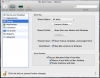
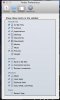
The option to mount this is checked in the Virtual Machine -> Configure... -> Options -> Sharing window. (See Screenshot 1). Also, Finder preferences allow Connected Servers (See Screenshot 2).
Have followed this document, but no help: http://download.parallels.com/desktop/v6/docs/en/Parallels_Desktop_Users_Guide/22907.htm. Found a couple of other's also. The last forum message on the topic I found is is 7 years old.
I'm lost as to how to get this working. Please help.
Thanks.
--DwightB
The option to mount this is checked in the Virtual Machine -> Configure... -> Options -> Sharing window. (See Screenshot 1). Also, Finder preferences allow Connected Servers (See Screenshot 2).
Have followed this document, but no help: http://download.parallels.com/desktop/v6/docs/en/Parallels_Desktop_Users_Guide/22907.htm. Found a couple of other's also. The last forum message on the topic I found is is 7 years old.
I'm lost as to how to get this working. Please help.
Thanks.
--DwightB