I am trying to pxe boot parallels into a SCCM 2007 network image but it says "Failed to find a valid network adapter." This is a Windows 7 image and would like to include the proper network drivers in the image so that it will work. I know in the past the driver was the realtek_8029 adapter, is it still the same adapter or has it changed to something else?

Install the app
How to install the app on iOS
Follow along with the video below to see how to install our site as a web app on your home screen.
Note: This feature may not be available in some browsers.
You are using an out of date browser. It may not display this or other websites correctly.
You should upgrade or use an alternative browser.
You should upgrade or use an alternative browser.
Network Adapter Drivers
- Thread starter odend42
- Start date

Elric
Parallels Team
Hi,
Parallels provides own drivers (although the card is able to work with drivers for rtl8029)
The Parallels drivers can be obtained at http://kb.parallels.com/en/5808. Also, if you are using Parallels Desktop 5.0, the network drivers are placed in the root of ISO with Parallels Tools - /Library/Parallels/Tools/prl-tools-win.iso
Just for history: there is also an article about creating Win2003 image for WDS (so it doesn't apply to your situation): http://kb.parallels.com/en/6833
Parallels provides own drivers (although the card is able to work with drivers for rtl8029)
The Parallels drivers can be obtained at http://kb.parallels.com/en/5808. Also, if you are using Parallels Desktop 5.0, the network drivers are placed in the root of ISO with Parallels Tools - /Library/Parallels/Tools/prl-tools-win.iso
Just for history: there is also an article about creating Win2003 image for WDS (so it doesn't apply to your situation): http://kb.parallels.com/en/6833
Last edited:
Elric
Parallels Team
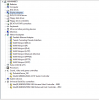
all my drivers are with problems and i Need to work :/ im stcked because i need the internet
Сool. Never have seen anything like this.
1) If you double click on faulted devices of ParallelsAdapter (with yellow exclamation), what is the error with it? (it is written on some of the tabs)
2) Are there any other devices with yellow-sign? Is there "ATI PCI Express(3GIO) Filter Driver"? If it is, please delete it.
Elric
Parallels Team
Сool. Never have seen anything like this.
1) If you double click on faulted devices of ParallelsAdapter (with yellow exclamation), what is the error with it? (it is written on some of the tabs)
2) Are there any other devices with yellow-sign? Is there "ATI PCI Express(3GIO) Filter Driver"? If it is, please delete it.
Also, try to delete the device "DsAudioDevice_310" - it may consume required resources and afaik should not be there
phesopheon
Member
Also, if you are using Parallels Desktop 5.0, the network drivers are placed in the root of ISO with Parallels Tools - /Library/Parallels/Tools/prl-tools-win.iso
I don't understand this response. The iso file has a setup.exe in it. Where are the drivers?
Paul