Networking Problem Win XP Host

dbaker

Bit poster
I'm having a problem with networking. I'm running a Windows XP SP2 host and Fedora 4 and Ubuntu as guest. Both guest operating systems are able to pull and IP address from DCHP (10.20.254.0) and I am able to ping the guest address from my host OS. The problem is that the guests are not able to access anything on the network. I am unable to ping the host or my gateway (no internet).

My machine has five different network connections

1. Wired Ethernet
2. WiFi (disabled)
3. Bluetooth (disabled)
4. Cisco VPN (disabled)
5. Parallels NIC

I disabled all of the connections that don't pertain to this issue as a means to simplify matters but that didn't seem to help much.

I would greatly appreciate any help that someone might be able to offer.
 
Active firewall in primary OS or in guest OS could be the issue. Try to disable it temporarily and check connectivity again. If my guess is correct then you should tune firewall to allow VM networking.
 
Baker, I'm having this same problem with wired ethernet. It may have to do with your cable modem. I am calling my ISP now and will tell you if I get anything to work.
 
Andrew,

I just called my ISP and they said the problem can be fixed via a router, which will assign static IP addresses to my systems. I also use XP with DHCP enabled right now. Is there a workaround in Parallels for this so I don't have to go out and get a router? I am having virtually the same issue as Baker it seems.

If there is a solution to this that doesn't involve running out and buying more equipment, please make sure you get commission off my purchase of Parallels! :D
 
Super awsome,

Most probably your ISP provides you with only a single IP address that is eligible to go into the internet.

Anyway, a solution to the problem could be the one described here:

Note: Before performing the following actions it is strongly recommended to stop Parallels DHCP service.

Go to the Control Panel and open the Administrative Tools. Double-click the “Services†icon. In the list of system services, find Parallels DHCP for Virtual NIC and double-click it. In the window that appears click the “Stop†button and wait until the service is stopped. You must also set the “Startup type†to “Disabledâ€. Click “Apply†and close the windows.

Note: After Internet Connection Sharing is no longer needed, restore the original configuration of Parallels DHCP service.

1. Configuring Primary OS

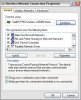
a. Open the Control Panel and double-click “Network Connectionâ€. Find your wireless network connection, right click its icon and choose “Propertiesâ€. A window like the one in the Fig. 1 will appear. Open the “Advanced†tab.
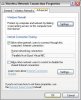
b. Enable the Internet Connection Sharing feature by marking the checkbox “Allow other network users to connect through this computer’s Internet connection†(Fig.2)

c. You also have to choose the network connection which will have access to the shared network. To do this, select the “Parallels Host-Guest Virtual NIC†in “Home networking connection†list box.

2. Configuring guest OS
Note: You must choose Host-only network type in Parallels Workstation. Please refer to the Parallels Workstation User Guide for additional information.

a. Power on your virtual machine and log in.

b. Allow the guest to use the shared connection by enabling automatic (via DHCP) configuration of network interface.
 

Attachments

  • fig1.JPG
    fig1.JPG
    46.1 KB · Views: 61
  • fig2.JPG
    fig2.JPG
    42.6 KB · Views: 71
Last edited:
Tim:
Your product and your assistance lives up to my name - time to register my copy of Parallels!


Baker:
I would try to do what Tim instructed me to do. I'm on wired, and everything works now.
 
Alright, I stopped the Parallels DHCP service as instructed and shared my network connection, however, this seems to have taken me in the wrong direction. The Parallels connection timed out when pulling an IP address from DHCP and was assigned 169.254.87.70. When I booted Fedora, it failed to initalize eth0 and gave an error that icmp access was denied. I used the settings button on the sharing tab in Windows to allow DHCP through the connection without success. I also assigned the Parallels connection a static IP on my local network and Fedora was assigned an IP address, but the outcome was the same as I've had all along. Any more ideas?
 
Andrew @ Parallels said:
Active firewall in primary OS or in guest OS could be the issue. Try to disable it temporarily and check connectivity again. If my guess is correct then you should tune firewall to allow VM networking.

Hi I am using Zone Alarm on Windows XP, I do not wish to disable it in order to gain access to my Fedora guest OS. May I know how to configure it. In order to know my guest IP, do i just use ipconfig...if that is the case mine is this:

Ethernet adapter Parallels Host-Guest Virtual NIC:

Connection-specific DNS Suffix . :
IP Address. . . . . . . . . . . . : 192.168.0.1
Subnet Mask . . . . . . . . . . . : 255.255.255.0

However, I give trusted access to 192.168.0.1 in Zone Alarm, it still did not give my Internet access to my guest OS.
 
.
If you use DHCP in the guest, then an ip in the range 10.37.129.x will be assigned. This will fit with the virtual nic setup a lot better.

Also, I must have been a good boy since April, hey.
.
 
Back
Top