
Hi guys,
I am using Parallels Desktop 9 for Mac, and am trying to install Windows XP home edition using an .iso file that I created from an old purchased CD. However, I keep getting this error:
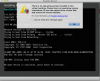
I have tried to change the boot order, by making CD/DVD first, and have tried to point it to the .iso file by selecting it in the CD/DVD 1 tab. Neither have worked.
I am using Parallels Desktop 9 for Mac, and am trying to install Windows XP home edition using an .iso file that I created from an old purchased CD. However, I keep getting this error:
I have tried to change the boot order, by making CD/DVD first, and have tried to point it to the .iso file by selecting it in the CD/DVD 1 tab. Neither have worked.