I just recently renewed my license and since then, I was not able to use parallel's desktop anymore. I am prompted with "No boot device available". Need your help on this please.

Install the app
How to install the app on iOS
Follow along with the video below to see how to install our site as a web app on your home screen.
Note: This feature may not be available in some browsers.
You are using an out of date browser. It may not display this or other websites correctly.
You should upgrade or use an alternative browser.
You should upgrade or use an alternative browser.
No boot device available
- Thread starter Loen
- Start date

Hemnath@Parallels
Parallels Support
Hi Loen. Thanks for reaching out! A support ticket will be created for you shortly and you'll be contacted by the support team.I just recently renewed my license and since then, I was not able to use parallel's desktop anymore. I am prompted with "No boot device available". Need your help on this please.
ChristopherR10
Bit poster
Hemnath@Parallels
Parallels Support
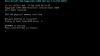
Hi ChristopherR10. Please reproduce the issue, generate a Problem Report ID while the error message is being displayed (very important) and reply with the report ID number. We'll then investigate.Hi I'm struggling with this issue as well, or at least a similar issue. Please contact me asap, it is really interfering with my work. I'm including a screen shot.
Hemnath@Parallels
Parallels Support
We have received your response over e-mail, as quoted below. Please post your responses directly in this thread henceforth (i.e., if you are seeing this message in your mailbox right now, then do not respond to this e-mail - just visit the thread you posted in before and provide your response there).
---------------------------------------------------------------------------
Report ID Number: 244625990
---------------------------------------------------------------------------
From the issue description given in the Problem Report ID, we understand that Windows OS is corrupted. Please check if there are any existing snapshots for your virtual machine. Else, have you been taking a Time Machine backup (or any other kind of backup) of your Mac (which means that Windows might also have been backed up)? We might try restoring Windows to an earlier working state and proceed from there.
---------------------------------------------------------------------------
Report ID Number: 244625990
---------------------------------------------------------------------------
From the issue description given in the Problem Report ID, we understand that Windows OS is corrupted. Please check if there are any existing snapshots for your virtual machine. Else, have you been taking a Time Machine backup (or any other kind of backup) of your Mac (which means that Windows might also have been backed up)? We might try restoring Windows to an earlier working state and proceed from there.
ChristopherR10
Bit poster
Okay so I did my oldest time machine backup and it was one day too late. Is there some reason that Parallels doesn't have a phone number for some phone support? Are there any other suggestions? There were no existing snapshots. How could I restore Windows to an earlier working state?
Hemnath@Parallels
Parallels Support
Please check our private message.Okay so I did my oldest time machine backup and it was one day too late. Is there some reason that Parallels doesn't have a phone number for some phone support? Are there any other suggestions? There were no existing snapshots. How could I restore Windows to an earlier working state?
Hi,
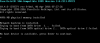
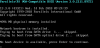
I'm using Parallels for Mac version 10.4.0 (29337) After installing a security update of macOs Sierra (2018-001 Version 10.12.6), parallels gives me the error that is no boot device available after trying from boot device harddisk as in attached file
I already tried the KBs 123344, 123150 and prl_dsk_tool command for hdd file
I've also tried to send this error by using the "Support Request" option on application but unfortunately request page gives me another error "Wrong Support Code" that is generated by the application.
I'm using Parallels for Mac version 10.4.0 (29337) After installing a security update of macOs Sierra (2018-001 Version 10.12.6), parallels gives me the error that is no boot device available after trying from boot device harddisk as in attached file
I already tried the KBs 123344, 123150 and prl_dsk_tool command for hdd file
I've also tried to send this error by using the "Support Request" option on application but unfortunately request page gives me another error "Wrong Support Code" that is generated by the application.
Attachments
S
Sathiya@Parallels
Hi SerkanY1. Parallels Desktop 10 is not compatible with macOS Sierra. Please refer this article for Parallels Desktop and Mac OS (Host) compatibility. Install the trial version of Parallels Desktop 13 for Mac and check whether it is working fine. If it works fine in the latest version, then you can purchase the license key and activate the product.Hi,
I'm using Parallels for Mac version 10.4.0 (29337) After installing a security update of macOs Sierra (2018-001 Version 10.12.6), parallels gives me the error that is no boot device available after trying from boot device harddisk as in attached file
I already tried the KBs 123344, 123150 and prl_dsk_tool command for hdd file
I've also tried to send this error by using the "Support Request" option on application but unfortunately request page gives me another error "Wrong Support Code" that is generated by the application.
S
Sathiya@Parallels
Please locate the virtual machine on your Mac and reply with its size and the file location.Hi Sathiya,
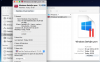
Now i've installed trial version 13 but again it gives me same error as below
SERKANY2, please generate report with technical data (see
https://kb.parallels.com/9058 for details) and share its ID here.
Note file Windows-8-0.hdd has zero size always, you might be interested in *.hds.
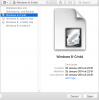
Looks like you have 1 snapshot. You can try to revert to that one.
https://kb.parallels.com/9058 for details) and share its ID here.
Note file Windows-8-0.hdd has zero size always, you might be interested in *.hds.
Looks like you have 1 snapshot. You can try to revert to that one.

Maria@Parallels
Problem solver
Did you received this error after update to Catalina? Which version of Parallels Desktop are you using?Hello Team,
I receive an error which read " No boot device avaliable", need assistance.
Please help !
Hi, I'm having the same problem: installed Catalina and now I get the "No boot device is available" message when trying to launch Windows 7 within Parallels. I've updated to Parallels 15.1.0 and have also set Parallels Desktop.app to have full disk access. Any suggestions? Thanks!
Maria@Parallels
Problem solver
Did you try this solution?Hi, I'm having the same problem: installed Catalina and now I get the "No boot device is available" message when trying to launch Windows 7 within Parallels. I've updated to Parallels 15.1.0 and have also set Parallels Desktop.app to have full disk access. Any suggestions? Thanks!
Thanks -- yes, that worked.Did you try this solution?