No Coherence in 5 - not tools or Mouse

CharlesA

Junior Member
I upgrded to Ver 5 and when I try to go into Coherence I get this message:


Unable to switch to Coherence.

The virtual machine display configuration could not be applied. Please try again or contact the Parallels Support team for assistance.

It seems there is no way to contact anyone at Parallels for free on an upgrade - no support request number. Any help appreciated. I have deleted and reloaded latest version of tools. It worked fine in Ver 4.
 
CharlesA, hello!

Please send Problem Report and post it's ID here. To send Problem Report open Virtual Machine window, choose 'Report a Problem' item from Help menu and then click 'Send Report' button.
 
Problem Report

Here is the number

Your problem report has been sent to the Parallels Support team with ID 745176.
 
Same Coherence Issue, Same Error

Just installed Parallels Desktop for Mac Yesterday and have the same problem of coherence not starting with the same error message as the previous post.
 
Charles, Tommy,

Have you display attached via USB-to-DVI device? If yes, this is being investigated.
 
USB Display

I have a small USB monitor attached, however the same thing occurs when I remove the USB display.
 
Attention correction

Coherence and Crystal DO work when I disconnect the second monitor via mini DVI connector. This on an iMac. I also had another small 7 inch monitor which was disconnected when Coherence operated property.
 
No USB or DVI Connected Displays

Serg,

For my case I have neither. I am running off a MBP 15" laptop screen.

Tom
 
This happens if using multiple displays

This happens for me every time I use a secondary display (regardless of whether I try to go into Coherence on the primary or secondary display).

As soon as the secondary display is unplugged, it works again.
 
Tommy, Prestond,
please send Problem Reports and post their ID here. We'll investigate your problems.
 
I reported an incident for it as well, but closed the window expecting I'd get an email confirming the incident ID - nothing has arrived. It was logged under the account 'pdeguise@gmail.com' though, so I'd hope it can be found that way.
 
Tommy, it is seems that Parallels Video Driver inside your Virtual Machine is not working.
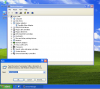
Try to reinstall Parallels Tools. If the problem remains then please post screenshot of Windows Device Manager with opened 'display adapters' tree.

For example:
 

Attachments

  • Clip 1.png
    Clip 1.png
    172.1 KB · Views: 28
Issue Resolved

SergK,

As it turns out there were no display drivers installed. Apparently some lower level drivers didn't install properly during the upgrade process. When I corrected those issues, the display driver automatically installed and now coherence works fine.

Thanks for your help.

Tom
 
Yes but my problem is really second monitor connected via mini DVI connector

Please see report # ID 745176. BTW I do not see the 25th post for USB work-around which is not extreme problem for me. As is the second iMac monitor via mini DVI connector
 
Work Around Fails

Unfortunately the the work around did not fix the problem. I guess I will need to go back to previous version until patch is released. However perhaps this problem will need further investigation.
 
Hi, I had the same trouble. I have 3 screens (no usb). If my main windows is on my right screen and click on coherence, I got that:

The virtual machine display configuration could not be applied

But if I put my main window on other screen and click coherence, it works! When coherence is running, I can put prgram windows on my right screen.

So if you have multiple screen, try to start the coherence on an other screen.
 
Back
Top