I have a 27" Mac with Parallels 10.10.2, Yoesmite 10.10.5 and Win 7 installed. All run OK.
I have a language dictionary app on CD.
I have Win 7 installed as above.
Inserted a the application CD in the Super Drive.
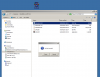
Opened Explorer and found the disc and canb read some file.
When executing the program from the CD, it fails with a 'No Disc Inserted' message.
Have tried moving the .exe to the C: drive, but get the same message.
The application provider states they only guarantee operation in native Windows, not when run under an emulator.
Has anyone experienced this and more importantly, found a solution.
Thanks
Dino
I have a language dictionary app on CD.
I have Win 7 installed as above.
Inserted a the application CD in the Super Drive.
Opened Explorer and found the disc and canb read some file.
When executing the program from the CD, it fails with a 'No Disc Inserted' message.
Have tried moving the .exe to the C: drive, but get the same message.
The application provider states they only guarantee operation in native Windows, not when run under an emulator.
Has anyone experienced this and more importantly, found a solution.
Thanks
Dino