No Network Connectivity in Win XP After Upgrade

clindner

Member
I upgraded, and everything was seemingly working fine.

Today, when I tried to access the internet through the VM, I get no response.

ipconfig reports that I am assigned an IP address as I would expect. My OS X Network info shows two Parallel Adapters, one Shared and One Host-Only, with bizzare IP assignments.

Any ideas? I have no clue as to where to start looking here.
 
I can add that it works fine if I change to Shared Networking rather than Bridged. But, it doesn't show up on the network as a browsable windows share like it used to.
 
ifconfig -a:

lo0: flags=8049<UP,LOOPBACK,RUNNING,MULTICAST> mtu 16384
inet6 fe80::1%lo0 prefixlen 64 scopeid 0x1
inet 127.0.0.1 netmask 0xff000000
inet6 ::1 prefixlen 128
gif0: flags=8010<POINTOPOINT,MULTICAST> mtu 1280
stf0: flags=0<> mtu 1280
en0: flags=8863<UP,BROADCAST,SMART,RUNNING,SIMPLEX,MULTICAST> mtu 1500
inet6 fe80::21b:63ff:feb1:5da9%en0 prefixlen 64 scopeid 0x4
inet 10.10.10.35 netmask 0xffffff00 broadcast 10.10.10.255
ether 00:1b:63:b1:5d:a9
media: autoselect (100baseTX <full-duplex,flow-control>) status: active
supported media: autoselect 10baseT/UTP <half-duplex> 10baseT/UTP <full-duplex> 10baseT/UTP <full-duplex,hw-loopback> 10baseT/UTP <full-duplex,flow-control> 100baseTX <half-duplex> 100baseTX <full-duplex> 100baseTX <full-duplex,hw-loopback> 100baseTX <full-duplex,flow-control> 1000baseT <full-duplex> 1000baseT <full-duplex,hw-loopback> 1000baseT <full-duplex,flow-control> none
en1: flags=8863<UP,BROADCAST,SMART,RUNNING,SIMPLEX,MULTICAST> mtu 1500
ether 00:1d:4f:ff:68:ea
media: autoselect (<unknown type>) status: inactive
supported media: autoselect
fw0: flags=8802<BROADCAST,SIMPLEX,MULTICAST> mtu 2030
lladdr 00:1d:4f:ff:fe:81:c1:a2
media: autoselect <full-duplex> status: inactive
supported media: autoselect <full-duplex>
en4: flags=8963<UP,BROADCAST,SMART,RUNNING,PROMISC,SIMPLEX,MULTICAST> mtu 1500
inet6 fe80::21c:42ff:fe00:8%en4 prefixlen 64 scopeid 0x9
inet 10.211.55.2 netmask 0xffffff00 broadcast 10.211.55.255
ether 00:1c:42:00:00:08
media: autoselect status: active
supported media: autoselect
en5: flags=8963<UP,BROADCAST,SMART,RUNNING,PROMISC,SIMPLEX,MULTICAST> mtu 1500
inet6 fe80::21c:42ff:fe00:9%en5 prefixlen 64 scopeid 0xa
inet 10.37.129.2 netmask 0xffffff00 broadcast 10.37.129.255
ether 00:1c:42:00:00:09
media: autoselect status: active
supported media: autoselect


ipconfig /all


Windows IP Configuration

Host Name . . . . . . . . . . . . : mac-winxp
Primary Dns Suffix . . . . . . . :
Node Type . . . . . . . . . . . . : Hybrid
IP Routing Enabled. . . . . . . . : No
WINS Proxy Enabled. . . . . . . . : No

Ethernet adapter Local Area Connection 4:

Connection-specific DNS Suffix . :
Description . . . . . . . . . . . : Parallels Ethernet Adapter #2
Physical Address. . . . . . . . . : 00-6E-C5-FC-3C-2B
Dhcp Enabled. . . . . . . . . . . : Yes
Autoconfiguration Enabled . . . . : Yes
IP Address. . . . . . . . . . . . : 10.10.10.45
Subnet Mask . . . . . . . . . . . : 255.255.255.0
Default Gateway . . . . . . . . . : 10.10.10.1
DHCP Server . . . . . . . . . . . : 10.10.10.6
DNS Servers . . . . . . . . . . . : 10.10.10.6
Primary WINS Server . . . . . . . : 10.10.10.6
Lease Obtained. . . . . . . . . . : Wednesday, December 03, 2008 12:08:5
3 PM
Lease Expires . . . . . . . . . . : Thursday, December 11, 2008 12:08:53
PM

Ethernet adapter Local Area Connection 2:

Media State . . . . . . . . . . . : Media disconnected
Description . . . . . . . . . . . : Astaro SSL VPN Adapter
Physical Address. . . . . . . . . : 00-FF-92-C9-C3-BF
 
This is very strange Mac Address
Connection-specific DNS Suffix . :
Description . . . . . . . . . . . : Parallels Ethernet Adapter #2
Physical Address. . . . . . . . . : 00-6E-C5-FC-3C-2B
Dhcp Enabled. . . . . . . . . . . : Yes
Autoconfiguration Enabled . . . . : Yes

Please stop VM, and in configure -Network Adapter 1 click generate
Please note Show Advanced settings should be checked
After that start VM
 
Please send a problem report using menu "Help"-"Report a Problem" and post its number here. Then please check the output of ipconfig /all one more time - is MAC address correct?
 
I have no idea where to find "help - report a problem"

On my home network, it is working fine. On my work network, it does not work. Both are DHCP based, and I have been using the same computer on it using the older version of Parallels for over a year with zero problems.

I don't have time to help troubleshoot the problem really.

Unfortunately, I have no choice, as the upgrade process saw fit to completely delete the backup I had made manually of all my files. I wish I had known it was going to delete all the files in my Parallels Images directory.

So, we are down to figuring out why it works on one network but not another....
 
I have no idea where to find "help - report a problem"
The menu "Help" for the Parallels Desktop contains menu item "Report a Problem"

On my home network, it is working fine. On my work network, it does not work. Both are DHCP based, and I have been using the same computer on it using the older version of Parallels for over a year with zero problems.
Wild guess: please try to disable firewall on Windows if you have one or firewall in the Parallels Internet Security. If you don't know how to disable firewall in "Parallels Internet Security", please try to uninstall it

Unfortunately, I have no choice, as the upgrade process saw fit to completely delete the backup I had made manually of all my files. I wish I had known it was going to delete all the files in my Parallels Images directory.
Upgrage process should affect only the VM that was upgraded. If there were more then one VM, then the rest should be left untouched. May be they were moved. Try to search in Finder.
 
My Problem ID number is 18838.

I do not have the Parallels Internet Security Installed. Disabling the Windows Firewall did not help.

I am unable to see any other computers on the network, internal or over the internet. I can't ping other machines or anything. When trying to access something, the network icon in the system tray only shows one activity light, not the other one.

Additionally, if I try to browse "Network Neighborhood" or "My Network Places" the system takes a LONG time to respond, and does not show any other machines on the network.

If I switch to Shared Networking, the Internet still works fine. However, I am unable to see other Windows machines on the local network, even though they show up for browsing under the Mac side. I can, however, ping machines by IP on my local network in XP.
 
My Problem ID number is 18838.

I do not have the Parallels Internet Security Installed. Disabling the Windows Firewall did not help.

I am unable to see any other computers on the network, internal or over the internet. I can't ping other machines or anything. When trying to access something, the network icon in the system tray only shows one activity light, not the other one.

Additionally, if I try to browse "Network Neighborhood" or "My Network Places" the system takes a LONG time to respond, and does not show any other machines on the network.

Could you please post here the output of command "route print" in Windows?
Do you able to ping 10.10.10.1?

If I switch to Shared Networking, the Internet still works fine. However, I am unable to see other Windows machines on the local network, even though they show up for browsing under the Mac side. I can, however, ping machines by IP on my local network in XP.

Just a quick workaround:

"I am unable to see other Windows machines on the local network" - it is possible to access these machines without browsing network, simply by name. E.g. there is some machine with name "storage". So it is possible to access it in Shared Networking by typing \\storage in the Explorer, Start->Run or "Open file" dialogs..
 
route print:

===========================================================================
Interface List
0x1 ........................... MS TCP Loopback interface
0x2 ...00 1c 42 d0 9a 52 ...... Realtek RTL8029(AS)-based Ethernet Adapter (Generic) #2 - Packet Scheduler Miniport
0x3 ...00 ff 92 c9 c3 bf ...... Astaro SSL VPN Adapter - Packet Scheduler Miniport
===========================================================================
===========================================================================
Active Routes:
Network Destination Netmask Gateway Interface Metric
0.0.0.0 0.0.0.0 10.10.10.1 10.10.10.40 10
10.10.10.0 255.255.255.0 10.10.10.40 10.10.10.40 10
10.10.10.40 255.255.255.255 127.0.0.1 127.0.0.1 10
10.255.255.255 255.255.255.255 10.10.10.40 10.10.10.40 10
127.0.0.0 255.0.0.0 127.0.0.1 127.0.0.1 1
224.0.0.0 240.0.0.0 10.10.10.40 10.10.10.40 10
255.255.255.255 255.255.255.255 10.10.10.40 3 1
255.255.255.255 255.255.255.255 10.10.10.40 10.10.10.40 1
Default Gateway: 10.10.10.1
===========================================================================
Persistent Routes:
None


I can ping 10.10.10.1 when in Shared Networking, but not in Bridged. In Bridged I get the "Request timed out." error.

I am not able to access network shares using the \\ method either...
 
route print:
All is correct...
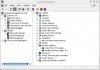
Could you please right-click my computer -> "manage" -> "Device Manager", unfold "Network Adapters" and post here the screenshot?

I am not able to access network shares using the \\ method either...
In the shared networking mode? Extremly strange. Could you please try to ping this machine by its name to know its ip-address and then access it by using this ip? For example, storage has ip 10.10.10.88, then \\10.10.10.88 ? Just as a test.
 
Screen capture is attached.

From Shared Networking I am able to browse shares using the \\ method. But not from Bridged.
 

Attachments

  • netscreencap.jpg
    netscreencap.jpg
    56.1 KB · Views: 10
Am I being ignored now?

No, you aren't. I was going to write an aswer. I've run out of ideas of how this can be investigated remotely.

There are no visible reason for such behaviour:
- DHCP gives an address, but it is impossible to ping it,
- shared networking works, while bridged, despite of visible DHCP server don't give an address.

Do you have some time in next week (approximately one hour)? I'd want to suggest a WebEx - session to let us investigate the problem inside your network (it's a kind of remote login/screen sharing). This will not require any your efforts. We just need to agree about time of the session, if the session is possible.
 
Yes, I should be here in the office every day next week (US Eastern Time), from 9 AM to 4 PM.

Don't know if you will be able to get past our network firewall, but we could give it a shot.
 
Back
Top