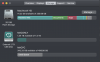
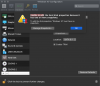
My parallels is using more and more disk space by the minute and I cannot operate programs on my Mac due to limited space. I am trying to limit the amount of space parallels can use as well as reclaim space. Why I try to configure disk usage, I get "Unable to edit the hard disk properties because it has one or more snapshots." But there are no snapshots in my snapshot manager. When I looked at what is taking up space by the parallels it was all snapshots, but I can't locate them. How do I find them and reduce the amount of space parallels uses?

No snapshots showing but still getting "Unable to edit the hard disk properties..." error
- Thread starter JohnH53
- Start date