I'm running Win 7 Home in Parallels 12.1.3 on a Mac mini running Sierra 10.12.3. I previously was running Parallels and Win XP on an iMac. After I migrated my information from the iMac to the new mini, I installed Win 7. There's no sound when I'm running the VM with Win 7. If I start up the old XP VM on the mini, the sound works fine. When I look under Control Panel and Sound in Win 7, it shows no audio devices installed. Not sure what I've missed, but clearly there's something. Any ideas?

Install the app
How to install the app on iOS
Follow along with the video below to see how to install our site as a web app on your home screen.
Note: This feature may not be available in some browsers.
You are using an out of date browser. It may not display this or other websites correctly.
You should upgrade or use an alternative browser.
You should upgrade or use an alternative browser.
No Sound in Win 7
- Thread starter BruceF3
- Start date
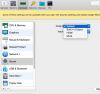

Hi BruceF3,I've tried all of the options there with the same result, no sound. When I look in the XP VM, where the sound works, the selection is Default.
Make sure audio is properly configured in Windows virtual machine.
Parallels Tools should be installed and updated. If Parallels tools are not installed or there is a red icon for Parallels Tools in the tool bar, please go to Parallels Desktop menu -> Virtual machine and select 'install Parallels Tools'. Please check out this article to install Parallels Tools and a fix for the Sound issue.

Maria@Parallels
Problem solver
Hi, please try this KBI've tried all of the options there with the same result, no sound. When I look in the XP VM, where the sound works, the selection is Default.
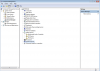
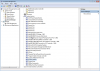
I followed the instructions for that KB article. There are no sound devices shown. I've attached a couple of screen shots of what I see. Maybe I should uninstall the System Speaker? Also, Parallels Toolbox is installed and up to date.
Attachments

kat
Product Expert
Have you tried to reinstall Parallels tools? I didn't see the Parallels Audio Controller installed. Please reinstall Parallels tools
You should also correct the missing Multimedia Audio Controller go to start menu>right click computer>properties>change settings>Hardware>device Installation Settings> make sure yes is selected.
This will allow for updates of drivers.
You should also correct the missing Multimedia Audio Controller go to start menu>right click computer>properties>change settings>Hardware>device Installation Settings> make sure yes is selected.
This will allow for updates of drivers.
Last edited:
We are glad to hear that the issue is resolved but would like to inform you Parallels Tools and Parallels Toolbox are both different. Feel free to reach us anytime for support.Removing and reinstalling Parallels Toolbox didn't change anything. However, changing the Device Installation Settings to Yes installed a driver and now the sound works!Thanks for the help!
My bad for not catching the Tools vs. Toolbox difference. I've installed Tools now and the Parallels Sound Controller referenced in an earlier post now appears in Device Management. There are three new things I've noticed after installing Tools. The folders on my Mac desktop are now also on the Windows desktop; the task bar is now translucent; and all the Mac apps now appear in the Start menu under Parallels Shared Applications. I'd rather the folders not be on the Win desktop. I'm hoping there's a setting somewhere to change that? The task bar change is fine. I'm not sure I understand the reason all those Mac apps are appearing on the Start menu.
kat
Product Expert
Hi BruceF3,
This knowledgebase article should help you make the changes (not sharing your mac with your vm) http://kb.parallels.com/en/122567
This knowledgebase article should help you make the changes (not sharing your mac with your vm) http://kb.parallels.com/en/122567