I cannot get sound to work in my VM for XP SP3 on my MacBook Pro 13". I have tried several drivers including the ones on the bootcamp disk and the latest on the RealTek site. I have also tried uninstalling Parallels Tools and reinstalling. I get this error in XP:
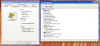
Under Device Manager yellow question mark for "multimedia audio device"
MacBook Info:
Hardware Overview:
Model Name: MacBook Pro
Model Identifier: MacBookPro5,5
Processor Name: Intel Core 2 Duo
Processor Speed: 2.53 GHz
Number Of Processors: 1
Total Number Of Cores: 2
L2 Cache: 3 MB
Memory: 4 GB
Bus Speed: 1.07 GHz
Boot ROM Version: MBP55.00AC.B03
SMC Version (system): 1.47f2
Serial Number (system): W800202A66J
Hardware UUID: F5E3E052-17BF-53B9-9295-FAFD539C18AB
Sudden Motion Sensor:
State: Enabled
XP Info attached in screen shot.
Thanks for any help.
-Dax
Under Device Manager yellow question mark for "multimedia audio device"
MacBook Info:
Hardware Overview:
Model Name: MacBook Pro
Model Identifier: MacBookPro5,5
Processor Name: Intel Core 2 Duo
Processor Speed: 2.53 GHz
Number Of Processors: 1
Total Number Of Cores: 2
L2 Cache: 3 MB
Memory: 4 GB
Bus Speed: 1.07 GHz
Boot ROM Version: MBP55.00AC.B03
SMC Version (system): 1.47f2
Serial Number (system): W800202A66J
Hardware UUID: F5E3E052-17BF-53B9-9295-FAFD539C18AB
Sudden Motion Sensor:
State: Enabled
XP Info attached in screen shot.
Thanks for any help.
-Dax