Hello,
1) Start your virtual machine,
2) Click on Start -> Control Panel -> System -> Hardware tab -> Device Manager,
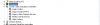
3) Right-click the "Sound, Video and game controllers" node and select "Scan for hardware changes".
Most probably a missing multimedia audio driver will be found. Please, install it.
NOTE: you might need to insert the Windows installation CD to install the driver.