No start menu or desktop Icons after upgrading IE

orlandomacguy

Bit poster
I updated to the latest version of Internet Explorer yesterday in parallels desktop running on an intel imac. Upon restarting, I get no start menu, no desktop Icons, and am unable to do anything. Please help!
 
Thank you, John, for your quick reply.

Unfortunately this did not work. I was able to change the view, however the start menu and desktop icons still are not there.

I'm positive that they are not there, I think I see what you were going for, that the start menu might be there but I just couldn't see it because it was off the screen?

I will greatly appreciate additional help and please let me know if you require any further information. Our company's quickbooks file is on there and we can't access it! yikes! Thanks for your help.
 
Nothing happens when right-clicking on desktop. We only have one user and there is no password or anything to log in, we just usually click on the parallels icon and windows starts with no issue. After upgrading IE it just sits with the desktop background visible but with no start menu or desktop icons. If I hit control-alt-delete and hit new process I can get quickbooks to run, so I'm guessing that it's not totally messed up. Any more ideas?
 
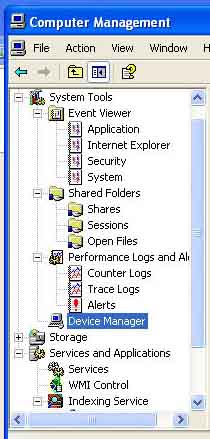
oops... just posted an empty reply... anyway I was unable to create a new user. I followed the link and saw how to do it under system tools, however as you can see in the attached screenshot there is no option to create a new user. I really appreciate the effort though...what next?
compmgmt.jpg
 
I searched all over the place and was unable to create the new user. Can you provide detailed instructions on how to do so, or suggest another possible solution? I really feel like it is something to do with me updating internet explorer because I started experiencing the problem right after I updated IE and we never had this issue before. I tried to uninstall IE from Appwiz.whatever but it does not even show up as being installed? I'm completely stumped and will so greatly appreciate a solution. Thanks.
 
ok, let us try another way:
in task manager run
cmd
in cmd
net user user 123qwe /add
net localgroup administrators user /add

After that you can login as user with 123qwe password

Or you can try
in Task manager

nusrmgr.cpl

and create new user
 
hmmm..... I was able to add the new user, however when I try to log in I get a blue screen that never goes away... There is a cursor and about every 20-30 seconds a little hourglass flashes, but the blue screen never goes away?

Also, If this helps. I get the message "windows explorer encountered a problem and needs to shut down, send error report" or something along those lines.whenever I log in with either user.

I'm heading out for the day, THANK YOU SO MUCH for all your efforts today and if you have any more ideas I will certainly try them 1st thing tomorrow morning.

Thanks John.
 
I suppose you do not have enough space on disk in Windows,
When you start Windows, you can see disk on desktop, move several files from Windows disk to Mac site (about 500mb)
 
Hmm... The desktop is completely blank... Do you mean I can see it on the desktop on the mac side? I'll give this a shot when I go into work in the morning. Thanks!
 
having the same problem - no icons or start menu on desktop

I don't recall upgrading explorer but I am having the same problem - when I open parallels there is no start menu, no icons, nothing and I can't even get the start menu to activate by going to actions - start menu. The only icons I have are the Parallels ones at the top of the screen. My screen had been my Mac screensaver or the blue windows screen but now it is just all black. What can I do to get my programs back and start working again in parallels?
 
were you able to solve this other person's (orlandomacguy) problem that sounds the same as mine? i tried the things you mentioned but they don't work for me - right-clicking on desktop does nothing, ctrl-alt-del does nothing and i can't get to the start menu to get to task manager. i also don't know how to see my windows programs from the mac side to make sure they are still there! or how to try editing my virtual machine when parallels is not running.
 
My Parellels is a little different than what you said but I found the Configuration Editor under Virtual Machine and chose the line item Shared Profile. When the Shared Profile popped up the Shared Profile Enable box was unchecked so I thought maybe that was the problem and instead of disabling like you said, I enabled it. Once it restarted my start menu and windows desktop came back up but now I have my Mac desktop icons on my Windows desktop because in the Shared Profile window the 4 boxes below the enable box were already checked when I clicked enable. I didn't install Parallels and don't know whether normally that Shared Profile is enabled or not. Should it be enabled? If so, do you think that was the source of my problem or is that a separate issue?
 
Back
Top