
Hi Parallel,
When I ZW3D CAD software, I want colors to be shown correctly instead of just single color, so that I can differentiate layers by colors.
Below I attached an image of the CAD apps when graphic kicks in correctly.
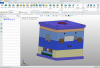 This is opened with ZW3D CAD on ASUS Vivobook laptop
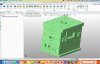 This is opened with ZW3D CAD on Apple MacBook Air M2
Thank you
When I ZW3D CAD software, I want colors to be shown correctly instead of just single color, so that I can differentiate layers by colors.
Below I attached an image of the CAD apps when graphic kicks in correctly.
This is opened with ZW3D CAD on ASUS Vivobook laptop This is opened with ZW3D CAD on Apple MacBook Air M2Thank you
