Boortsneggor
Bit poster
Hello,
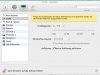
I am using a VM with Windows 8.1 in Parallels Desktop 9. Most of the time I ve been working in Coherence-Mode. I ve read on several explanations that there are new options in configuration->video to set scaled resolutions. But this option aren't there in my configurations-dialog. I only see the checkbox for activating the retina-resolution, displayed in the screen shot attached. How can I get these options? Reinstalling PD doesn't solve the problem.
Thanks for help.
Greets robert
I am using a VM with Windows 8.1 in Parallels Desktop 9. Most of the time I ve been working in Coherence-Mode. I ve read on several explanations that there are new options in configuration->video to set scaled resolutions. But this option aren't there in my configurations-dialog. I only see the checkbox for activating the retina-resolution, displayed in the screen shot attached. How can I get these options? Reinstalling PD doesn't solve the problem.
Thanks for help.
Greets robert