Outlook 2013 screen redraw

DoniK

Hunter
When restoring Outlook 2013 from being minimized in systray, the screen often does not redraw properly. The underlying windows will show through parts of it. I have disabled hardware acceleration in Outlook and disabled add-ins, but neither has helped. Some reports online have suggested this is a graphics driver issue, but since this is Parallels, I can't try a different driver.

Anyone else?

PD 9.0.23140.935944 (latest)
Mac Mini mid-2011
Win 8.1 x64 + latest patches
Office 2013 + latest patches
256MB VRAM + DX10
Windowed VM (not coherence) + "Windows 7 Look"
 
Last edited:
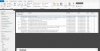
Screenshot below. The gray area is my desktop wallpaper showing through, where it doesn't redraw. To fix each time, I have to re-size the Outlook 2013 window, such a maximize and restore down again.

Outlook2013redraw.jpg
 
Last edited:
DoniK,
here are some questions for you:
1) What mode are you using: Coherence, Fullscreen or Windowed?
2) Check '3D acceleration' option in Virtual Machine configuration: is it ON or OFF?
3) Please create Problem Report then send it and post it's ID here.
 
Please check the next Outlook option:
File->Options->Advanced->Display->'Disable hardware graphics acceleration'. Is it On or Off?
 
Thanks, but I've already answered these questions in my OP. Outlook hardware graphics acceleration is disabled.
 
Good idea, should have tried that. Made the change, so far so good. But sometimes it looks good for a little while and then gets bad again, so will report back later today. Thanks!
 
Back
Top