P

Install the app
How to install the app on iOS
Follow along with the video below to see how to install our site as a web app on your home screen.
Note: This feature may not be available in some browsers.
You are using an out of date browser. It may not display this or other websites correctly.
You should upgrade or use an alternative browser.
You should upgrade or use an alternative browser.
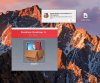

Hi, Parallels Desktop 8 for Mac is not compatible with Mac OS Sierra and that's the reason you're unable to install it on your Mac. Please purchase Parallels Desktop 12 for Mac which is an optimized version of Mac OS Sierra. Please check this KB article to get trial for Parallels Desktop 12 for Mac.
P
Parallels User
>>> Message has been deleted by the user <<<

Dinesh@Parallels
Guest
Hi @IlanE ,Thank you. can I upgrade to 12 from 8 and save some $$ ?
Please check your private message and respond to the thread.
Hi,
1 week before the parallels 11 work ok with sierra. Now the windows started an stop after window Picture with a DOS Screen. So i have deinstall parallel Desktop and will install Parallels new. so i get the Window with "Parallels Desktop can be installed from a disk image only"......
What to do?
1 week before the parallels 11 work ok with sierra. Now the windows started an stop after window Picture with a DOS Screen. So i have deinstall parallel Desktop and will install Parallels new. so i get the Window with "Parallels Desktop can be installed from a disk image only"......
What to do?

Maria@Parallels
Problem solver
Hi, you can try the following:Hi,
1 week before the parallels 11 work ok with sierra. Now the windows started an stop after window Picture with a DOS Screen. So i have deinstall parallel Desktop and will install Parallels new. so i get the Window with "Parallels Desktop can be installed from a disk image only"......
What to do?
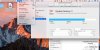
- OpenApplications>Utilities>Disk Utility.
- Go toMacmenu >Disk Utility>Preferences.
- DisableChecksum Verification.
Hi Hans-G, A master boot record (MBR) or a boot sector is corrupted.Hi,
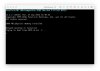
i could start parallels an start windows. And now it stop on this windows (see picture) and then it will repair windows....... but without Success.....
You can use the Bootrec.exe tool in the Windows Recovery Environment to troubleshoot and repair the following items in Windows:
A master boot record (MBR).
A boot sector.
A Boot Configuration Data (BCD) store.