Parallels 10, keystrokes are ignored by windows applications

DaveCazz

Junior Member
Just upgraded to 10 a couple days ago and I am noticing that sometimes windows applications are ignoring all input from the keyboard.

in order to get it working again I have to go back and forth, activate an app on the mac side, go back to the windows side and it eventually works again but this is very annoying.
 
Am suffering a failure of the keyboard (not mouse) in Version 10.2.1 (29006)
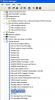
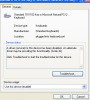
In Windows XP have gone into: Start > My Computer > Manage > Device Manager and the Keyboards area has a yellow exclamation mark against the Standard 101/102-key or Microsoft Natural PS/2 keyboard.
Have tried updating and uninstalling and reinstalling keyboard driver without success.
Not sure what else to do so looking for assistance here.
Many thanks in advance.
 
Am suffering a failure of the keyboard (not mouse) in Version 10.2.1 (29006)
In Windows XP have gone into: Start > My Computer > Manage > Device Manager and the Keyboards area has a yellow exclamation mark against the Standard 101/102-key or Microsoft Natural PS/2 keyboard.
Have tried updating and uninstalling and reinstalling keyboard driver without success.
Not sure what else to do so looking for assistance here.
Many thanks in advance.
Hi MarcosM1,
Please follow the knowledge base article http://kb.parallels.com/112939 to fix Keyboard drivers and check how it works.
 
Paul, Thanks for the prompt response.
I have followed your knowledge base article link including reinstalling the Parallel Tools
Unfortunately the problem was not resolved.
I have attached some screenshots for you to view.
I have tried uninstalling the keyboard driver but this merely reappears on restarting the virtual machine (Windows XP).
Hope you have some more ideas.
Many thanks,
Marcos
 

Attachments

  • Screen Shot 2015-06-15 at 10.17.47 pm.png
    Screen Shot 2015-06-15 at 10.17.47 pm.png
    46.3 KB · Views: 6
  • Screen Shot 2015-06-15 at 10.17.05 pm.png
    Screen Shot 2015-06-15 at 10.17.05 pm.png
    47.2 KB · Views: 4
I let P10 install an update, and I now have no keyboard in Windows XP. I have the same driver indications as the OP. Tools appears to have been installed successfully. As to the troubleshooting page linked to above, I find this to be ironic since I cannot type in windows:
  1. In Windows go to the Start menu and type in the Search bar or Run menu:

    devmgmt.msc
 
Same exact problem...no keyboard since Parallels Version 10.2.1 (29006) update.
Hardwired nor bluetooth, uninstalled - reinstalled Parallels tools..uninstalled / reverted back to Parallels 10 Version 10.0 no change.
Followed instructions http://kb.parallels.com/112939 no change...comes back with same screen shots as above.
What to do now?
 
Dear Parallels Support Team,
Is someone on to this? Can we have a rollback or fix?
Please keep us informed... seems quite a few people are affected and hanging out there...!
It's getting close to a week since this issue was reported.... longer since it first occurred :-(
 
Finally bit the bullet and upgraded to 10 yesterday (big mistake!) I too am experiencing the keyboard lag noted above in Windows 7. The keys seem to work only intermittently. I cannot tell you how HUGH this problem is. I have to type o n e l e t t e r a t a t i m e a n d v e r i f y e a c h k e y s t r o k e.

Please get us a fix immediately. I didn't expect to pay for an upgrade only to have the most basic function not work!
 
I uninstalled P10, reinstalled the pre-broken version, and installed Tools - still no joy. Our IT guy got Bluetooth Radios added to XP's device manager, but I still have bad keyboard and mouse drivers that neither of us can fix. (The Parallels Mouse Synchronization thingie and Parallels USB Synchronization thingie are missing as well.)
In addition, every XP is rebooted it wants to reinstall the "HP8500" driver and I have to once again show it where the driver is located.

It wanted to update again so I let it - no joy. I created a service ticket to see if anything happens there.

(If it wasn't for the need to use UPS Worldship, and being unable to get my saved emails into MacMail, I would not need XP.)
 
Hi @TimP2,
As I know you and our Second level support resolved this issue using the following steps:

1. Changed permissions on VM files
2. Created a new VM and connected the original .hdd to the new one.

Please correct me, if I'm wrong and let me know if the issue still persists.
 
We were never able to solve the Windows driver issues. Attempts to do so rendered mouse clicks inoperable. We shall uninstall everything and start over (for the second time). (Or just add a cheap PC for our Windows needs.)
 
Back
Top