
Hi,
The company I work for wants us to put Kaspersky anti-virus software on our system, which is a change from Symantec that they were providing us. I'm having a problem uninstalling the Symantec Endpoint Protection, and I can't get it to uninstall, and my company doesn't know what to tell me either.
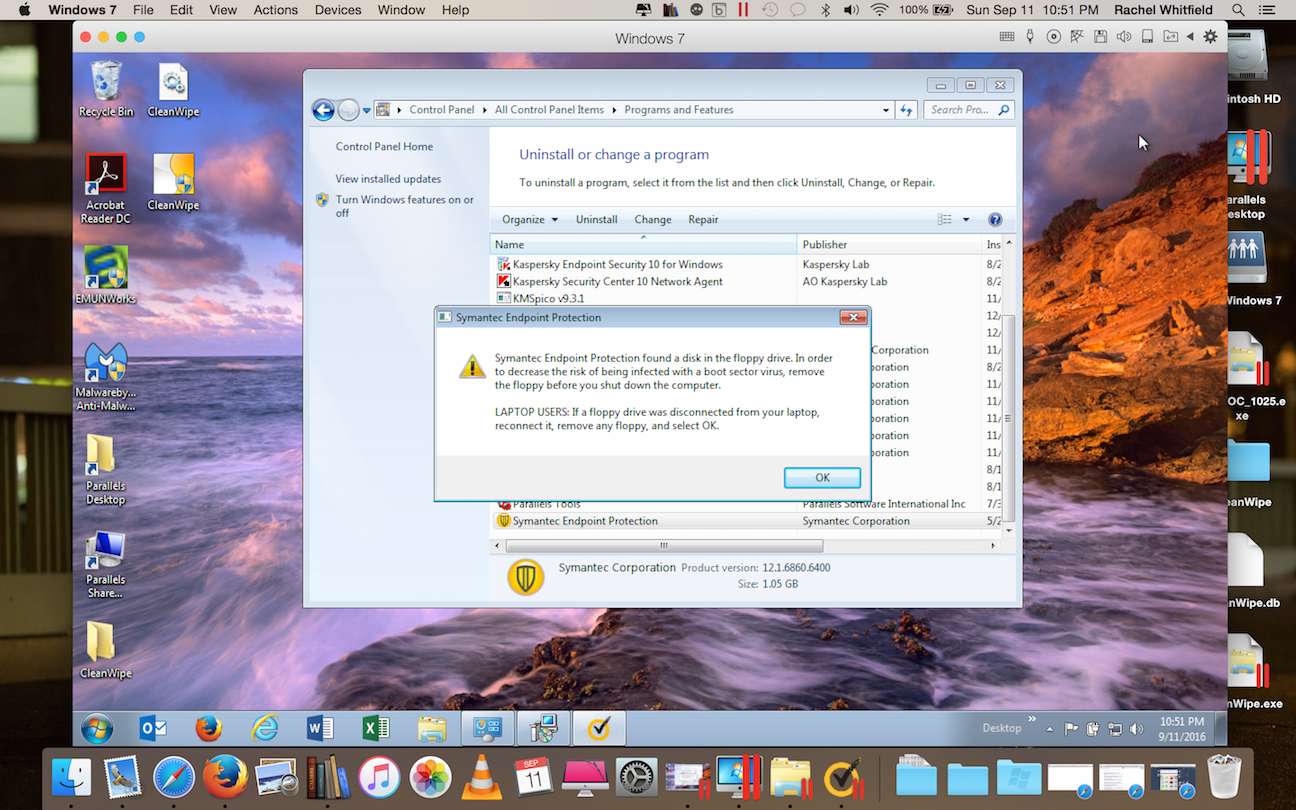
The first screenshot is the first message that comes up, and then the second one is the next message that keeps popping up and if I click OK it just keeps coming back. I don't have a floppy drive/CD drive/USB anything attached to my laptop at the moment, so I don't know what it's finding?
Any suggestions on what I can do to uninstall this software? Thank you in advance!

The company I work for wants us to put Kaspersky anti-virus software on our system, which is a change from Symantec that they were providing us. I'm having a problem uninstalling the Symantec Endpoint Protection, and I can't get it to uninstall, and my company doesn't know what to tell me either.
The first screenshot is the first message that comes up, and then the second one is the next message that keeps popping up and if I click OK it just keeps coming back. I don't have a floppy drive/CD drive/USB anything attached to my laptop at the moment, so I don't know what it's finding?
Any suggestions on what I can do to uninstall this software? Thank you in advance!

