Hi
I tryied this steps to install the parallels in my laptop, and has crashed my bootcamp partition three times:
1) create bootcamp using windows.iso and bootcamp macOS application
2) updated windows 8 to windows 8.1
3) installed parallels 11 in my macOS
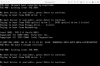
4) create the virtual machine using the existing bootcamp option
5) black screen appears with this message and eliminating the bootcamp.
Now I can not restart in windows mode either.
And I have to eliminate the bootcamp partition, install the windows again.
This is a BIG ISSUE! that needs URGENT ATTENTION!!
This is the 3rd time this happens to me.....
I tryied this steps to install the parallels in my laptop, and has crashed my bootcamp partition three times:
1) create bootcamp using windows.iso and bootcamp macOS application
2) updated windows 8 to windows 8.1
3) installed parallels 11 in my macOS
4) create the virtual machine using the existing bootcamp option
5) black screen appears with this message and eliminating the bootcamp.
Now I can not restart in windows mode either.
And I have to eliminate the bootcamp partition, install the windows again.
This is a BIG ISSUE! that needs URGENT ATTENTION!!
This is the 3rd time this happens to me.....