Hi I have been experiencing this problem twice now since I have been trying to update Parallels in my mac. The story is as following:
A) THE FIRST TIME I TRYED THIS STEPS:
A.0) Created partition with bootcamp in my mac
A.1) Installed windows 8 + all updates from bootcamp session
A.2) Updated to windows 8.1 + all updates from bootcamp session
A.3) Try to install again the new windows in Parallels following the steps listed in this link (http://kb.parallels.com/en/115026)
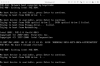
A.4) I can not get to the point where the parallels actually update and let me erase the parallels tools, it always freeze to this screen I attached and I loose the partition.
A.5) I have to eliminate the windows bootcamp partition and start again.
B) THE SECOND TIME I TRYED THIS STEPS:
B.0) Created partition with bootcamp in my mac
B.1) Installed windows 8 + all updates from bootcamp session
B.2) Installed Parallels in Mac Session
B.3) Created a virtual machine from the existing bootcamp because I need a windows to be modified from the mac and same data be available from bootcamp.
B.4) Updated to windows 8.1 + all updates from bootcamp session
B.5) Try to install again the new windows in Parallels following the steps listed in this link (http://kb.parallels.com/en/115026)
B.6) I can not get to the point where the parallels actually update and let me erase the parallels tools, it always freeze to this screen I attached and I loose the partition.
B.7) I have to eliminate the windows bootcamp partition and start again.
I don't know what to do, except to not use the windows parallels anymore until some reasonable solution comes up. PLEASE HELP!
A) THE FIRST TIME I TRYED THIS STEPS:
A.0) Created partition with bootcamp in my mac
A.1) Installed windows 8 + all updates from bootcamp session
A.2) Updated to windows 8.1 + all updates from bootcamp session
A.3) Try to install again the new windows in Parallels following the steps listed in this link (http://kb.parallels.com/en/115026)
A.4) I can not get to the point where the parallels actually update and let me erase the parallels tools, it always freeze to this screen I attached and I loose the partition.
A.5) I have to eliminate the windows bootcamp partition and start again.
B) THE SECOND TIME I TRYED THIS STEPS:
B.0) Created partition with bootcamp in my mac
B.1) Installed windows 8 + all updates from bootcamp session
B.2) Installed Parallels in Mac Session
B.3) Created a virtual machine from the existing bootcamp because I need a windows to be modified from the mac and same data be available from bootcamp.
B.4) Updated to windows 8.1 + all updates from bootcamp session
B.5) Try to install again the new windows in Parallels following the steps listed in this link (http://kb.parallels.com/en/115026)
B.6) I can not get to the point where the parallels actually update and let me erase the parallels tools, it always freeze to this screen I attached and I loose the partition.
B.7) I have to eliminate the windows bootcamp partition and start again.
I don't know what to do, except to not use the windows parallels anymore until some reasonable solution comes up. PLEASE HELP!