Ever since I upgraded from 12 to 13 my MacBook screen saver won't engage after the preset time interval when Parallels Desktop is running. When I look at the Energy tab on the Mac Activity Monitor it says Parallels Desktop is preventing sleeping. I haven't discovered a way to keep that from happening. I seem to recall there was a setting on the 12 VM configuration options page to allow that, but it seems to have disappeared in 13. How do I change it so Parallels Desktop will allow the Mac to sleep?

Install the app
How to install the app on iOS
Follow along with the video below to see how to install our site as a web app on your home screen.
Note: This feature may not be available in some browsers.
You are using an out of date browser. It may not display this or other websites correctly.
You should upgrade or use an alternative browser.
You should upgrade or use an alternative browser.
Parallels 13.0.1 Prevents Mac from Sleeping
- Thread starter JamesG17
- Start date
Arun@Parallels
Parallels Support

Hemnath@Parallels
Parallels Support
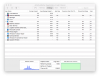
Can you please share a screenshot of this scenario?When I look at the Energy tab on the Mac Activity Monitor it says Parallels Desktop is preventing sleeping.
Arun@Parallels
Parallels Support
Yes, I tried changing the power and sleep settings in the W10 VM. It had absolutely no effect because Parallels Desktop was preventing the Mac from sleeping as shown in previous responses. Apparently I'm not the only one having this problem. I discovered
"After upgrading to Parallels 13, my iMac display won 't sleep!" posted by user Ahwman in the Installation and Configuration forum. Low and behold, when I unchecked 'Allow apps to auto-switch to full screen' in VM config - Options - Applications as suggested by Parallels developer StanislavZ, Parallels Desktop showed up in the Mac Activity Monitor as not preventing sleep after restarting the desktop and things are back to working as they should! What an obvious connection between the option label and the effect! I don't know how I could have missed that. Please fix this problem so others don't have to live with this annoying "feature" (AKA bug).
"After upgrading to Parallels 13, my iMac display won 't sleep!" posted by user Ahwman in the Installation and Configuration forum. Low and behold, when I unchecked 'Allow apps to auto-switch to full screen' in VM config - Options - Applications as suggested by Parallels developer StanislavZ, Parallels Desktop showed up in the Mac Activity Monitor as not preventing sleep after restarting the desktop and things are back to working as they should! What an obvious connection between the option label and the effect! I don't know how I could have missed that. Please fix this problem so others don't have to live with this annoying "feature" (AKA bug).


Hi @EiichiY, that's great! You may also try this setting: System Preferences --> Security & Privacy --> Advanced --> uncheck "Log out after 15 minutes of inactivity" and keep us posted the results.I don't know why but Reinstalling Parallels Tools (NOT Parallels Toolbox for Windows) from the Actions menu will fix the problem, if you are lucky.
# Sometimes it works, sometimes doesn't.
View attachment 12965
Hi @PatrickK6, start your virtual machine and reinstall Parallels Tools to fix the issue. If it persists, you may try this setting:Thanks for posting this. I have been having the same problem. Looking forward to a solution.
System Preferences --> Security & Privacy --> Advanced --> uncheck "Log out after 15 minutes of inactivity" and keep us posted the results.
Thanks.Hi @EiichiY, that's great! You may also try this setting: System Preferences --> Security & Privacy --> Advanced --> uncheck "Log out after 15 minutes of inactivity" and keep us posted the results.
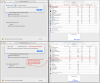
As the Log out after... was not checked in the first place in my case, I intentionally checked it and saw what would happen (top panel), and ended up with insomnia again :<
At this point, unchecking the CheckButton alone can't cure the symptoms, but here's some tips (bottom panel).
Last edited:
Have you tried all the three solutions in this thread?Yes, by the way, I'm also very interested in how to solve all this problem.