
Parallels 15.0.0 (46967)
macOS 10.14.6 (18G95)
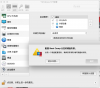
When I add a bootcamp drive, it always show me:
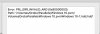
PRL_ERR_INVALID_ARG (0x80000003)
My bootcamp partition is /dev/disk3s4
/dev/disk3 (external, physical):
#: TYPE NAME SIZE IDENTIFIER
0: GUID_partition_scheme *600.0 GB disk3
1: EFI EFI 209.7 MB disk3s1
2: Apple_APFS Container disk5 499.8 GB disk3s2
3: Microsoft Reserved 134.2 MB disk3s3
4: Microsoft Basic Data Windows2Go 99.7 GB disk3s4
5: Apple_Boot 134.2 MB disk3s5
macOS 10.14.6 (18G95)
When I add a bootcamp drive, it always show me:
PRL_ERR_INVALID_ARG (0x80000003)
My bootcamp partition is /dev/disk3s4
/dev/disk3 (external, physical):
#: TYPE NAME SIZE IDENTIFIER
0: GUID_partition_scheme *600.0 GB disk3
1: EFI EFI 209.7 MB disk3s1
2: Apple_APFS Container disk5 499.8 GB disk3s2
3: Microsoft Reserved 134.2 MB disk3s3
4: Microsoft Basic Data Windows2Go 99.7 GB disk3s4
5: Apple_Boot 134.2 MB disk3s5
