ParallelsU735
Bit poster
Done. Here is my Report, ID 376890286.Hello, could you collect the tech report once the issue is reproduced and post the report's ID here please?

Follow along with the video below to see how to install our site as a web app on your home screen.
Note: This feature may not be available in some browsers.
Done. Here is my Report, ID 376890286.Hello, could you collect the tech report once the issue is reproduced and post the report's ID here please?
Hi, please choose the default adapter given below the title "Bridged network". Thanks.This is what it looks like
View attachment 18223
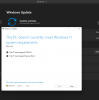
The 17.0.1 update fixes these issues for me. I am able to join the Beta ring and no longer receive the warning.I am also experiencing the "does not meet minimum hardware requirements" issue. Parallels 17 (51461), Windows build 22000.160, on a MBA (M1, 2020) running macOS Monterrey 12.0 Beta 21A5304g. 4GB RAM, 4 processors, and TPM is installed on VM. Please let me know if I may help nailing this down. I'd like to know I can continue using Windows past Preview.
Hello Zeek, Please refer to this KB article: https://kb.parallels.com/122702 . Thanks.
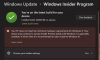
 M$ States WDDM 2 as minimum requierment