Parallels 19.1 and Windows 11 stopped opening USB drives

Discussion in 'Windows Virtual Machine' started by ArkadiuszS1, Oct 27, 2023.

  1. ArkadiuszS1

    ArkadiuszS1 Bit poster

    Messages:
    3
    Hi,
    Today I found that my Windows 11 for ARM VM can not open any USB drives. It is visible in device manager but not in Windows Explorer. Any idea how to fix it?

    BR
    Arek
     
  2. JoeH17

    JoeH17 Bit poster

    Messages:
    3
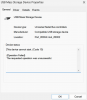
    I'm having the same issue except with intel based mac. I opened a ticket with parallels but have not gotten a response. This is the error message that I get.
     

    Attached Files:

  3. Trishna Oobeyram

    Trishna Oobeyram Staff Member

    Messages:
    375
    Hello,
    Ideally for a USB mass storage device, you should connect it to the Mac, and then use it as a shared device.
    You can set Parallels Desktop to automatically mount storage devices and volumes to Windows. That way, you can access the contents from both macOS and Windows.
    You can do that by performing the steps below:
    1. Open your virtual machine Configuration.
    2. Go to Options > Sharing > Share Mac
    3. Make sure you tick Share Mac volumes with Windows.
    Secondly, if you have a scenario where you need to connect a specific USB device to the virtual machine, as a workaround, you will need to install Parallels Desktop 19.0.0 Build.
    Regards,
     
  4. JoeH17

    JoeH17 Bit poster

    Messages:
    3
    Any ETA for the fix? I'd rather not downgrade.
     
  5. ChristophH12

    ChristophH12 Bit poster

    Messages:
    2
    Hi,
    the shared Folder solution does not help me. I'am using a License Dongle for a Windows Software. The Software does only recognize the License if the Dongle is connected "directly" to the Windows OS.
    Is there any other solution?
     
  6. VanessaD4

    VanessaD4 Bit poster

    Messages:
    2
    I have the same issue. The first solution is not working. Is there only a downgrade left als soloution? Maybe an update coming to fix this problem?
     
  7. JoeH17

    JoeH17 Bit poster

    Messages:
    3
    The newest version of macOS fixed this issue for me ; 14.1.1
     
  8. VanessaD4

    VanessaD4 Bit poster

    Messages:
    2
    Unfortunately the new macOS didn't fix it for me.
     
  9. Avinash Bundhoo

    Avinash Bundhoo Staff Member

    Messages:
    806
    Hello,

    Thank you for your feedback.

    We have a fix for the issue regarding USB devices in the latest version (Parallels Desktop 19.1.1).

    Please update the software and let us know if it resolves your issue.

    Thanks
     
  10. Avinash Bundhoo

    Avinash Bundhoo Staff Member

    Messages:
    806
    Hello,

    Please update Parallels Desktop to the latest version.

    Let us know if the issue persists.

    Thanks
     
  11. TattooTroy

    TattooTroy TattooTroy Bit poster

    Messages:
    5
    I have the same issue. Network and vehicle diagnostic USB devices are not recognised in Windows 11 arm M2 ma
     
  12. Avinash Bundhoo

    Avinash Bundhoo Staff Member

    Messages:
    806
    Hello!
    In order to proceed with further investigation, kindly provide us with the below information:
    1. Reproduce the issue.
    2. Collect a technical report (right-click Parallels icon in Dock > Help > Send technical data > check "Attach screenshots..." > press Send Report) and send the report's 9-digit ID in a reply.
    Thank you!
     
  13. TattooTroy

    TattooTroy TattooTroy Bit poster

    Messages:
    5
    Report ID: 461166765

    Hi, thanks for your reply. The device is a Bosch GM MDI-2 diagnostic USB interface.
    The drivers are located here. https://www.boschdiagnostics.com/software-updates/software-gm-mdi-and-mdi-2
    What it looks like https://www.ebay.co.uk/itm/386451627013

    On Intel Mac and parallels, it works properly and shows up in the device manager as network Bosch VCI. See the photo.
    [​IMG]

    On M2 and M1 Mac Windows 11 ARM and Windows 10 Arm it shows as USB serial com port and it cannot communicate wit the diagnostic software.
    [​IMG]
     
    RPC90 likes this.
  14. RPC90

    RPC90 Bit poster

    Messages:
    1
    Having a similar issue with a different device. Has there been a solution to your problem? I went from the intel MBP to the MBP M4
     
  15. BrianD28

    BrianD28 Junior Member

    Messages:
    10
    I don't know whether this applies to the particular problems you folks are having, but I found during my migration to MacBook M3 running Tahoe that upon power on, the USB drive was not visible/accessable and a small clue message appeared saying to unlock access.

    Do this search: usb drive security privacy settings mac

    System Settings > Privacy & Security > Allow accessories to connect

    All is now well.
     

Share This Page