I recently installed a trial version of Parallels 8 with Windows 7. The main reason for installing was to use Autodesk Inventor.
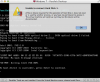
During use of the program (creating a new drawing, if it's of any interest), Parallels/Windows crashed, and when I tried reopening it, it gives me the following error message:
Unable to connect to Hard Disk 1
A file or device required for the operation of Hard Disk 1 does not exist or is used by another process, or you have no permission to access it. The virtual machine will continue running, but the device will be disconnected.
In the background, the "Install Windows 7" dialogue box comes up (se picture below).
I can't seem to find a solution to my problem online, can anyone help me?

During use of the program (creating a new drawing, if it's of any interest), Parallels/Windows crashed, and when I tried reopening it, it gives me the following error message:
Unable to connect to Hard Disk 1
A file or device required for the operation of Hard Disk 1 does not exist or is used by another process, or you have no permission to access it. The virtual machine will continue running, but the device will be disconnected.
In the background, the "Install Windows 7" dialogue box comes up (se picture below).
I can't seem to find a solution to my problem online, can anyone help me?