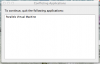
I have Parallels Desktop v8 for Mac. I set up two virtual desktops (Windows 7 and Snow Leopard) and have been running without a problem for approximately a year. I hadn't used Parallels in a few months, so when I started it a few days ago, I got a message that there was an update, so I ran it. Now when I try to start Parallels, I get an error message that says, "To continue, quit the following applications: Parallels Virtual Machine". I searched the 'net for a solution and found something that involves the Activity Monitor, but that wasn't the problem.
I'm running 10.7.5 with 12GB RAM and, like I said, have had no trouble in the past. Any suggestions?
Thanks,
Lloyd
I'm running 10.7.5 with 12GB RAM and, like I said, have had no trouble in the past. Any suggestions?
Thanks,
Lloyd