
Ed of the Mountain
Bit poster
How can I setup an OSX guest with a hard disk any bigger than 64GB?
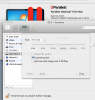
It does not let me change size before VM setup. After setup I cannot use VM settings to edit the 64GB expanding disk hard disk.
I attached screen shot below:
Parallels 9.0.24237
It does not let me change size before VM setup. After setup I cannot use VM settings to edit the 64GB expanding disk hard disk.
I attached screen shot below:
- The size spin-box and slider are disabled.
- I cannot check "Resize file system"
Parallels 9.0.24237