Parallels Desktop 8 - trying to install a VM of Yosemite beta - VM won't boot

boogieted

Bit poster
In Parallels Desktop 8 (most current version) I have set up a virtual machine of Mavericks successfully. Then I have attempted to update to the public beta of Yosemite. It downloads and seems to install. Then, when it must reboot to complete I can only get this screen and can't get Yosemite to load:Screenshot 2014-08-09 08.22.38.png
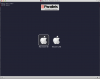
It will then only allow me to select Recovery HD and then it wants to reinstall Mavericks if I select Recovery HD.
I'm looking for recommendations on how I should resolve this, or if it's even possible to run a VM of Yosemite in Parallels 8. Thanks.
 
Thanks for the reply, but you may have misread my message. I'll re-explain: My iMac runs Mavericks. Parallels 8 has a Mavericks virtual machine set up for the purpose of upgrading that virtual machine to a beta of Yosemite. Thus, Yosemite is not my main OS on my iMac, rather I'm attempting to run it INSIDE a Parallels 8 virtual machine.

I understand that Yosemite won't run Parallels 8. I'm trying to do the exact opposite: use Parallels 8 to run Yosemite. Thanks.
 
"The Parallels Team is currently supporting Yosemite only on our current version, Parallels Desktop 9, and has not made any Yosemite-related updates to Parallels Desktop 8 at this time."

Currently you'll find on these forums threads about running Yosemite as a VM on PDM9, and if you look at those threads you'll see people saying they aren't able to run it. So, if it's impossible or difficult to make it run on 9 currently, it will be much worse on 8.
 
Back
Top