
Install the app
How to install the app on iOS
Follow along with the video below to see how to install our site as a web app on your home screen.
Note: This feature may not be available in some browsers.
You are using an out of date browser. It may not display this or other websites correctly.
You should upgrade or use an alternative browser.
You should upgrade or use an alternative browser.
Parallels Desktop for Mac build 3036 Beta is available for download.
- Thread starter STim
- Start date
- Status
- Not open for further replies.
I wish i could figure out how you got it working. A lot of us seem to be unable to install Parallels Tools for Boot camp on XP Corp with VLKs. The installer dies before creating the hardware profiles with an error that it is unable to find drivers.cab.akac said:Here here! Just because one configuration doesn't work for the guy (Retail XP) does not mean it wasn't worth getting it out. The fact is that Parallels may not be able to do anything about the Retail XP activation - nothing at all - but I applaud them for letting those of us with MSDN or corporate licenses actually get this working.

Delphyne said:I wish i could figure out how you got it working. A lot of us seem to be unable to install Parallels Tools for Boot camp on XP Corp with VLKs. The installer dies before creating the hardware profiles with an error that it is unable to find drivers.cab.
Patience my friend. Patience.
This is a raw diamond in the making...
I've got the same prob as you, but the guys at parallels have only released it last friday. So, they only had today to address the issue.
You didn't really think that they would have been able to read through all this feedback & have a fix for us immediatly?
Let's just see what they come up with next......
Hello there,
I'm quite impressed about how things seem to be going this fast in here...
Maybe I was a little too happy though...
Reading Boot Camp, I just thought about running the whole stuff with my rEFIt triple boot system which does not seem to be possible for the moment...
Keep the work up.
I'm quite impressed about how things seem to be going this fast in here...
Maybe I was a little too happy though...
Reading Boot Camp, I just thought about running the whole stuff with my rEFIt triple boot system which does not seem to be possible for the moment...
Keep the work up.
Screensaver behavior
Coherence is great. But there seems to be a possible bug with the Windows screensaver -- when in coherence mode, the Windows screensaver is visible, not transparent, in full screen over the OS X desktop. An easy workaround is to de-activate the screensaver.
Coherence is great. But there seems to be a possible bug with the Windows screensaver -- when in coherence mode, the Windows screensaver is visible, not transparent, in full screen over the OS X desktop. An easy workaround is to de-activate the screensaver.
pcalver said:I'm afraid that Parallels has torn its britches on this little episode. It will be a long time before any serious Intel Mac user thinks about using the Parallels software as anything other than a toy. You need to come clean about this debacle, show some transparency in your release process, and rebuild your reputation, guys.
Boot Camp is BETA software, too.
Parallels is being transparent about their release process. If they released this build as a Release Candidate or the final version, THAT would be a problem.
Yes, beta software can have big bugs like this too. The main issue most people have is with Windows asking for reactivation. I assume that you can still use the software once the reactivation is done.
But beta software ALWAYS carries some risk. Sure, some beta software doesn't have any apparent bugs, but some does. Something as complex as Parallels is bound to have big bugs in beta (say that 3 times fast).
They haven't sullied their reputation at all. The fact that they are releasing betas to us instead of just "springing" these new features on us without any warning is something I wish Apple would do more of.
bobbydigital
Bit poster
This is just a small suggestion for a feature, but it would really be helpful..
Under 'General Options' for a VM, it would be really great to just have a space for notes on a particular VM. I'm using Parallels for building kernels and it's really easy to screw up something, so I save a lot of successful builds as separate VMs. It's not space efficient but I feel more secure with a VM backup than anything else. Plus, with all the tiny differences between each VM, using the filename to keep track of the differences gets really ugly. Plus this seems like a very simple add. I know you can write comments on files in OS X but it would be nice to view these through the Parallels interface.
But overall this is an AWESOME build! I haven't played with any Bootcamp features but everything else seem's very nice. The kernel catalogue is so nice to have in my situation, I'm sure you can imagine. I'm so happy I bought Parallels!
Under 'General Options' for a VM, it would be really great to just have a space for notes on a particular VM. I'm using Parallels for building kernels and it's really easy to screw up something, so I save a lot of successful builds as separate VMs. It's not space efficient but I feel more secure with a VM backup than anything else. Plus, with all the tiny differences between each VM, using the filename to keep track of the differences gets really ugly. Plus this seems like a very simple add. I know you can write comments on files in OS X but it would be nice to view these through the Parallels interface.
But overall this is an AWESOME build! I haven't played with any Bootcamp features but everything else seem's very nice. The kernel catalogue is so nice to have in my situation, I'm sure you can imagine. I'm so happy I bought Parallels!
Wow! This is a HUGE release! A few quirks...
Man, This is cool! A few quirks I have found. Great for a beta.... I LOVE Coherence Mode.
1. When IE is open and you switch from wired to wireless, Parallels crashes, at least for me.
2. Auto hide of the Windows Task Bar doesn't seem to work consistently when using Coherence mode. It gets sticky when you close certain applications.
3. It seems to use a lot more CPU time (Beta software will do that).
Great job Parallels!
Man, This is cool! A few quirks I have found. Great for a beta.... I LOVE Coherence Mode.
1. When IE is open and you switch from wired to wireless, Parallels crashes, at least for me.
2. Auto hide of the Windows Task Bar doesn't seem to work consistently when using Coherence mode. It gets sticky when you close certain applications.
3. It seems to use a lot more CPU time (Beta software will do that).
Great job Parallels!
Last edited:
theirongiant
Bit poster
I've seen excellent progress on this software from its humble beginnings. I bought a license when it was RC1. Now I want to use the integrated Boot Camp feature, but it's not working right.
I have just installed Beta 3036 on my Intel iMac 20". I have the 250GB hard drive partitioned thus: 230GB for Mac OS X, and about 15GB for Windows XP SP2, formatted FAT32. The other 5GB is lost due to "rounding errors."
Parallels Boot Camp Tools installer failed here. But I have some information that may or may not be helpful.
I booted up into XP through Boot Camp, then downloaded and installed the tools in Boot Camp XP, but the installer failed abruptly without warning during the copying process. No error messages were given on screen; the installer just "disappeared." Going back to Mac OS X, the option for a new VM to "Use Boot Camp" is, unfortunately, still greyed out.
So I poked around the hard drive and found a log file for the Parallels Boot Camp Tools installer in the ~/Local Settings/Temp folder. The filename is parallels-bctools-install.log:
It's clearly looking for the Driver.cab file found in C:\Windows\Driver Cache\i386. My Boot Camp partition is on Drive C, or so the computer thinks. I'm using MacDrive 6.1, and all my other Macintosh drives and partitions are visible (the internal partition, two external drives, plus an iPod nano).
Why can't the installer find that file in my Windows system folder? Is it because of MacDrive? Or some other reason?
I have just installed Beta 3036 on my Intel iMac 20". I have the 250GB hard drive partitioned thus: 230GB for Mac OS X, and about 15GB for Windows XP SP2, formatted FAT32. The other 5GB is lost due to "rounding errors."
Parallels Boot Camp Tools installer failed here. But I have some information that may or may not be helpful.
I booted up into XP through Boot Camp, then downloaded and installed the tools in Boot Camp XP, but the installer failed abruptly without warning during the copying process. No error messages were given on screen; the installer just "disappeared." Going back to Mac OS X, the option for a new VM to "Use Boot Camp" is, unfortunately, still greyed out.
So I poked around the hard drive and found a log file for the Parallels Boot Camp Tools installer in the ~/Local Settings/Temp folder. The filename is parallels-bctools-install.log:
Set Logging to 2
bctool_install() finished with rc 5
Parallels Tools for Boot Camp Setup program cannot find file %s\Driver Cache\i386\driver.cab. This file is required for successful installation of Tools and can be found on Windows XP installation CD.
Setup cannot be continued.
It's clearly looking for the Driver.cab file found in C:\Windows\Driver Cache\i386. My Boot Camp partition is on Drive C, or so the computer thinks. I'm using MacDrive 6.1, and all my other Macintosh drives and partitions are visible (the internal partition, two external drives, plus an iPod nano).
Why can't the installer find that file in my Windows system folder? Is it because of MacDrive? Or some other reason?
Last edited:
skaratso said:Boot Camp is BETA software, too.
But beta software ALWAYS carries some risk. Sure, some beta software doesn't have any apparent bugs, but some does. Something as complex as Parallels is bound to have big bugs in beta (say that 3 times fast).
They haven't sullied their reputation at all. The fact that they are releasing betas to us instead of just "springing" these new features on us without any warning is something I wish Apple would do more of.
Boot Camp's beta works, and was sufficiently tested to work from day one for the vast majority of users. This Parallels software is perhaps ready for a closed, private beta test group (at best), but not for a public beta that goes out of its way to attract attention. I stand by my comments.
Mouse Drivers and Coherence
I found that after installing the driver for my mouse (Microsoft IntelliMouse Optical) Parallels locked up when trying to go into Coherence mode.
The solution was to go into the Mouse settings in the Control Panel and Roll Back the driver to the Parallels mouse driver.
I found that after installing the driver for my mouse (Microsoft IntelliMouse Optical) Parallels locked up when trying to go into Coherence mode.
The solution was to go into the Mouse settings in the Control Panel and Roll Back the driver to the Parallels mouse driver.
I'm not sure what you thought I was being impatient about. All I've done is provide information (in the appropriate thread) about the issue.tychop said:Patience my friend. Patience.
This is a raw diamond in the making...
I've got the same prob as you, but the guys at parallels have only released it last friday. So, they only had today to address the issue.
You didn't really think that they would have been able to read through all this feedback & have a fix for us immediatly?
Let's just see what they come up with next......
don montalvo
Hunter
pcalver said:Boot Camp's beta works, and was sufficiently tested to work from day one for the vast majority of users. This Parallels software is perhaps ready for a closed, private beta test group (at best), but not for a public beta that goes out of its way to attract attention. I stand by my comments.
aside from venting, what constructive feedback have you offered? why not check your baggage at the door and list the issues in detail. the parallels team have an incredible track record - they respond and they act. this last beta offers what a lot of people have been waiting for (namely, the ability to use your bootcamp partition) so forum traffic is high. if you're not happy beta testing, uninstall or revert and go away...come back when the soup is done.

don
Last edited:
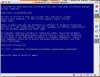
blue screen crash after second reboot after installing new parallels tools in b3036
Hi,
Last night I upgraded to 3036. When my image booted up, it told me (as expected) that I needed to install the new parallels tools. I ran the tools installation and at the end of the process I restarted as the installer requested. Everything was fine when the vm rebooted. I was able to use the system for many hours with no problems. I shut down the vm when I finished using last night. This morning I opened the same vm and booted. This time I get a blue screen crash right before where I would expect the windows login screen to come up. I tried to reboot the vm a few more times but I got the same result. I then rebooted into safemode where I was asked if I wanted to do a system restore. I did the system restore from before the new parallels tools had been installed. Restarted and everything was fine again - except now I had the old parallels tools. Just to do further testing, I repeated the whole process again. I installed the new tools -> restarted after the installer -> system came up fine -> restarted again -> blue screen crash -> did windows restore. I did the whole procedure several times all with the same result.
I have attached a jpeg of the blue screen.
The VM is windows XP SP2. The guest computer is set for around 800 MB of ram, bridged networking, 80 GB expanding hard drive (16 Gb used) and the host computer is an iMac 2 GB RAM, 2.16 Intel Core 2 Duo os 10.4.8
Hi,
Last night I upgraded to 3036. When my image booted up, it told me (as expected) that I needed to install the new parallels tools. I ran the tools installation and at the end of the process I restarted as the installer requested. Everything was fine when the vm rebooted. I was able to use the system for many hours with no problems. I shut down the vm when I finished using last night. This morning I opened the same vm and booted. This time I get a blue screen crash right before where I would expect the windows login screen to come up. I tried to reboot the vm a few more times but I got the same result. I then rebooted into safemode where I was asked if I wanted to do a system restore. I did the system restore from before the new parallels tools had been installed. Restarted and everything was fine again - except now I had the old parallels tools. Just to do further testing, I repeated the whole process again. I installed the new tools -> restarted after the installer -> system came up fine -> restarted again -> blue screen crash -> did windows restore. I did the whole procedure several times all with the same result.
I have attached a jpeg of the blue screen.
The VM is windows XP SP2. The guest computer is set for around 800 MB of ram, bridged networking, 80 GB expanding hard drive (16 Gb used) and the host computer is an iMac 2 GB RAM, 2.16 Intel Core 2 Duo os 10.4.8
Attachments
theirongiant said:I have just installed Beta 3036 on my Intel iMac 20". [...] about 15GB for Windows XP SP2, formatted FAT32. [...] Parallels Boot Camp Tools installer failed here.
Hi,
if you want to boot your bootcamp-partition using parallels it has to be NTFS _NOT_ FAT32.
You can convert your drive in bootcamp, by entering the following command in the terminal (DOS prompt / CMD):
Code:
convert c: /fs:ntfsWindows will restart and convert your FAT32 bootcamp partition to NTFS.
I had some trouble launching the bootcamp-drive using parallels, because the bootcamp-vm was inactive, so I opened my other VM that has a virtual drive image and pointed it to the bootcamp-partition. Everything worked fine, make sure to choose the Parallels Configuration when booting (dialog box after the boot).
- Phi l
Vista
Yes, as stated by another user, Bootcamp has supported Vista since Vista RC2.
However, that is irrelevant to my question.
My question is simply, does Parallels expect to support booting into a Vista Boot Camp installation in the near future, or is ther something that will technicaly prevent that??
Much appreciated.
Seth
Yes, as stated by another user, Bootcamp has supported Vista since Vista RC2.
However, that is irrelevant to my question.
My question is simply, does Parallels expect to support booting into a Vista Boot Camp installation in the near future, or is ther something that will technicaly prevent that??
Much appreciated.
Seth
- Status
- Not open for further replies.