Parallels Desktop Trial Version

JohannesS11

Bit poster
Now, I have a new Apple Mac Studio with Apple silicon chip, and I want to test the new Parallels Desktop 19 for 14 days. But I get no button "14 Tage lang kostenlos testen" in the window. I get this window:
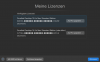
upload_2024-5-2_10-5-7.png
Where can I activate a 14 days trial version?
Best regards
 
Hello, I have the same problem. After new registration and new instalation I have no button to test 2 weeks on MacBook Air.
I need to test OpenVpn before payement.

Kindly regards.
 
Good afternoon,

I'm still waiting for the answer. When will Parallels Support help me? I need a 14 -day test time to try OpenVPN VPN on Mac.
Unfortunately, nowhere I do not see a button to activate the 14 -day period.

Kindly regards
 
Good afternoon,

I'm still waiting for the answer. When will Parallels Support help me? I need a 14 -day test time to try OpenVPN VPN on Mac.
Unfortunately, nowhere I do not see a button to activate the 14 -day period.

Kindly regards
Please, try to post your problem in a new thread.
Good luck.
 
Back
Top