Been struggling with getting the "virtual machine is running. Whats should be done with it? Stop? Cancel" message every time I try to close a window in my Mac OS virtual machine.
I just started using Parallels 6, and I must say I can't grok the keyboard-handling philosophy at all. Presumably, people want to use their VMs the same way the use a physical computer - so why would anyone want Cmd+W or Cmd+Q to quit Parallels entirely? Especially since it's obvious and easy enough to exit the VM by mousing in the top-left corner of the screen! Also, there are apps like Final Cut where pressing Alt+Cmd+something is NOT the same as pressing Cmd+Alt+something... this is rare, but it happens, and afaik Parallels would not be able to handle this at present.
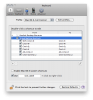
It took me almost an hour to find a way to get the command keys back. What you need to do is launch, Parallels Desktop, go to "Parallels Desktop > Preferences > Keyboard", create a new profile (I called mine "Mac OS X, Full Control") and add mappings for anything Parallels itself already handles (eg: map Cmd+Q to Cmd+Q). See the attached screen shot.
If anyone has a better solution, I'd love to hear it. If the Parallels app gets updated and they add new key commands, I imagine I'll have to revisit the mappings.
I just started using Parallels 6, and I must say I can't grok the keyboard-handling philosophy at all. Presumably, people want to use their VMs the same way the use a physical computer - so why would anyone want Cmd+W or Cmd+Q to quit Parallels entirely? Especially since it's obvious and easy enough to exit the VM by mousing in the top-left corner of the screen! Also, there are apps like Final Cut where pressing Alt+Cmd+something is NOT the same as pressing Cmd+Alt+something... this is rare, but it happens, and afaik Parallels would not be able to handle this at present.
It took me almost an hour to find a way to get the command keys back. What you need to do is launch, Parallels Desktop, go to "Parallels Desktop > Preferences > Keyboard", create a new profile (I called mine "Mac OS X, Full Control") and add mappings for anything Parallels itself already handles (eg: map Cmd+Q to Cmd+Q). See the attached screen shot.
If anyone has a better solution, I'd love to hear it. If the Parallels app gets updated and they add new key commands, I imagine I'll have to revisit the mappings.