Parallels Tools Kills Windows 10 Insider Preview Build 14926

MarkByrn

Member
So after updating to the subject build and reinstalling Parallels Tools, got the blue screen of death as pictured below. Repair failed and the only option was to do reset PC however the same error occurred on a clean copy of the build after installing Parallels Tools.
System Info
Parallels Version 12.0.1 (41296)
Model Name: MacBook
Model Identifier: MacBook8,1
Processor Name: Intel Core M
Processor Speed: 1.3 GHz
Number of Processors: 1
Total Number of Cores: 2
L2 Cache (per Core): 256 KB
L3 Cache: 4 MB
Memory: 8 GB
Boot ROM Version: MB81.0164.B18
SMC Version (system): 2.25f87
macOS 10.12 (16A320)

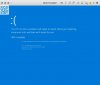
Error.png
 
As a workaround I booted into safe mode and deleted all the Parallels drivers from Device Manager. I could then get the VM to boot - I reinstalled Parallels Tools and just haven't rebooted for now!! Not ideal but at least my VM is usable and I don't have to rebuild it.
 
Got the same error. However, I found a workaround that allows you to work with Win10 Insider Preview 14926 AND fully functional Parallel Tools.

Reboot the VM containing build 14926 with reinstalled Parallel Tools; this causes BSOD, but system enters Repair Mode after an iteration or so. Now select Advanced Options | Troubleshoot | Advanced Options | Startup Settings | Restart, and subsequently choose "Enable low-resolution video". The system duly boots in lo-res, but the proper resolution kicks in as soon as the logon screen appears; after this, the system will run stably. If you enable the Boot option "Base video" in msconfig, you can restart the system at leasure from then on.

The error is being investigated by Parallels Support.

Update 25 September: Win 10 Insider Preview 14931 doesn't have the problem--must have been a bug in 14926...
 
Last edited:
Got the same error. However, I found a workaround that allows you to work with Win10 Insider Preview 14926 AND fully functional Parallel Tools.

Reboot the VM containing build 14926 with reinstalled Parallel Tools; this causes BSOD, but system enters Repair Mode after an iteration or so. Now select Advanced Options | Troubleshoot | Advanced Options | Startup Settings | Restart, and subsequently choose "Enable low-resolution video". The system duly boots in lo-res, but the proper resolution kicks in as soon as the logon screen appears; after this, the system will run stably. If you enable the Boot option "Base video" in msconfig, you can restart the system at leasure from then on.

The error is being investigated by Parallels Support.
I had the same error and the low res video fix worked for me, thanks Marinus!
 
I get the exact same error as the OP and then Windows 10 automatically "recovers" to the previous build (Build 14915.rs_prerelease) and that reboots just fine. The problem is that the build I am stuck on will "Expire on Oct. 1" according to the pop-up that appears when booting.

I tried any number of things when googling the problem and nothing has fixed the problem. Even bought the upgrade to Parallels to version 12.0.2 (41353) thinking that might help and it still errors out with the prl_kmdd.sys error.

Is there any chance that a fix might occur before the Windows 10 expiration date?
 
Can anyone confirm the issue remains with today's Insider Build? I'm still uninstalling Parallels tool program first before installing the Insider Build and installing it afterward. Last Insider build had the same issue.
 
Can anyone confirm the issue remains with today's Insider Build? I'm still uninstalling Parallels tool program first before installing the Insider Build and installing it afterward. Last Insider build had the same issue.
On my system, the latest build (14942) works fine; however, now MalwareBytes root kit scanner (which has nothing to do with Parallels Desktop, of course) causes a BSOD, so I had to deactivate that first... but that's what you get when running beta versions, I guess.
 
For everyone wondering, this issues exists in the last 3 versions of Windows 10 Fast Ring Insider Edition. I updated to 15055 and the issues STILL exists. Restart, let it run diagnostics, and then choose option 3 (the Low Res option that User MarinusB suggested - cannot thank him enough). You will be able to boot and it works pretty well. The "Base Video" option in msconfig *DOES* allow you to restart; and Parallels will correct the bad video (although on a 2016 TouchBar MacBook it has letterboxing).

Hoping Parallels / Windows figures this out soon!
 
Back
Top