Last week, I made the regrettable decision to upgrade Parallels to Version 17.1.4 (51567). Since that time, my Windows 10 PVM has been auto pausing after 15-30 minutes.
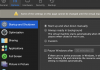
I tried these steps: "Shut Down the Virtual Machine. Access configuration options > Options tab > Startup and Shutdown > and uncheck the "Pause Windows After" dropdown."
The problem is that the checkbox is ALREADY unchecked. Now, there seems to be no way to keep my VM from pausing with the latest upgrade. All my searches and googling lead me to long since obsolete articles dating back to PD12
Anybody else experiencing this issue and/or have any suggestions?
I tried these steps: "Shut Down the Virtual Machine. Access configuration options > Options tab > Startup and Shutdown > and uncheck the "Pause Windows After" dropdown."
The problem is that the checkbox is ALREADY unchecked. Now, there seems to be no way to keep my VM from pausing with the latest upgrade. All my searches and googling lead me to long since obsolete articles dating back to PD12
Anybody else experiencing this issue and/or have any suggestions?