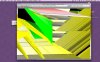
Parallels Version 5584 Video Corruption

PToomeyJr

Member
I am running Parallels 5584, but this problem started with 5582. I am running on an iMac version 10.5.1 with 3 GB of memory and 133 GB of free disc space. I have alocated 1 GB of memory of the VM.

If I run Parallels all day eventually I get some video corruption that shows up on my desktop background Oh, I run Parallels in coherence mode. The corruption looks like two vertical columns of small rectangular looking things. I will attach a screen capture of these things. They do not seem to affect the operation of the program but clearly you have a memory leak of some type.

Patrick Toomey
Charlottesville, VA
 

Attachments

  • Picture 2.png
    Picture 2.png
    10.3 KB · Views: 29
Problem with Build 5608 too...

I'm also getting massive video corruption problems with parallels 5608. I've attached two images. It makes my computer unusable and I have to restart. This is on a 2.16 GHz MBP with 3GB of RAM. It seems to happen after I start and stop the VMs a lot. I was setting a a few VMs for various test environment and I started seeing some small blocky corruption, then the stuff in the screenshot started happening.
 

Attachments

  • Picture 1.jpg
    Picture 1.jpg
    23.3 KB · Views: 22
  • Picture 2.jpg
    Picture 2.jpg
    22 KB · Views: 16
Corruptions with Build 5608

I am seeing similar corruptions, although only on the Mac OS X Desktop area running 10.5.4 on MBP CD (Radeon 1600 Pro). I think the problem started with the update to QuickTime 7.5.5.

Im using the German Build 5608.

I tried reinstalling as outlined by the link above, but it didn't change a thing.

Besides today the Mac OS X kernel crashed, when opening After Effects CS3 while a Linux i386 VM was running.

-- Felix
 
Last edited:
Please note, that you need to use localized build instead of provided link.
About Mac OS crash, please check crash log to find out, which application caused crash
 
As already noted I did use the current localized german build 5608 of parallels.

I doubt you'll get anything useful out of this crash log:
Process: mach_kernel [Unknown]
Path: kernel_task
Identifier: mach_kernel
Version: ??? (???)
Code Type: X86 (Native)
Parent Process: mach_kernel [Unknown]

Date/Time: 2008-09-10 05:32:17.078 +0200
OS Version: Mac OS X 10.5.4 (9E17)
Report Version: 6

Exception Type: EXC_CRASH (SIGABRT)
Exception Codes: 0x0000000000000000, 0x0000000000000000
Crashed Thread: Unknown

Backtrace not available

Unknown thread crashed with X86 Thread State (32-bit):
eax: 0x00000000 ebx: 0x96d87f99 ecx: 0xa08f0684 edx: 0xa08ed100
edi: 0x00000015 esi: 0x00000001 ebp: 0xbfffeda8 esp: 0xbfffed70
ss: 0x0000001f efl: 0x00010202 eip: 0x96d87fca cs: 0x00000017
ds: 0x0000001f es: 0x0000001f fs: 0x00000000 gs: 0x00000037
cr2: 0x00000000

Binary images description not available
 
Unfortunately it doesn't give useful information,
It doesn't show process, you can try to find another crash logs in /Library/Logs/
Or just from usage of Mac , and logs from Console application, you may try to find is there other problems.
 
Back
Top