Parallels Windows applications posing as email clients

AveryC

Bit poster
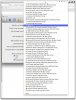
When I am in the Apple Mail app and I am selecting a default email reader, all of the Parallels Windows applications appear in the drop down menu. I suspect it is because Parallels is telling Desktop Services that it can handle all the extensions that a typical email application can. How can I stop Parallels from doing this? (See the attached screenshot)

I am running

Parallels: 7.0.15054.722853
Mac OS X: 10.7.3

Thanks!
 

Attachments

  • Mail Screenshot-001.jpg
    Mail Screenshot-001.jpg
    180.1 KB · Views: 3
Yep, I had the exact same issue. Another thread told me to shut down Win7, go to Parallels > Configure Virtual Machine > Options > Applications. Turn off all application sharing options between Win7 and Mac. Quit Paralells. When I did that and went to my Mac Mail preferences the old standby Mail.app as default reappeared. This behavior affected the way Mail interacted with MS Word and Acrobat for Send To . . . functions. All seems well now.
 
Back
Top