
Updated PD12 to PD13.0.1. VM in windowed mode. macOS 10.12.6.
Windows application icons no longer appear in the macOS dock. I've tried restarting PD, restarting the dock, reinstalling Parallels Tools, and retoggling VM settings, to no avail. Same problem if I click "Show Windows application folder in Dock": it doesn't show (I normally have that disabled anyway). "Show Windows notification area in Mac menu bar" doesn't seem to do anything either.
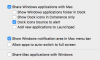
My VM's Application settings:
Thanks
Windows application icons no longer appear in the macOS dock. I've tried restarting PD, restarting the dock, reinstalling Parallels Tools, and retoggling VM settings, to no avail. Same problem if I click "Show Windows application folder in Dock": it doesn't show (I normally have that disabled anyway). "Show Windows notification area in Mac menu bar" doesn't seem to do anything either.
My VM's Application settings:
Thanks

