
Install the app
How to install the app on iOS
Follow along with the video below to see how to install our site as a web app on your home screen.
Note: This feature may not be available in some browsers.
You are using an out of date browser. It may not display this or other websites correctly.
You should upgrade or use an alternative browser.
You should upgrade or use an alternative browser.
PD4 keeps "sharing" Mac Partitions
- Thread starter epirali
- Start date
John@Parallels
Forum Maven
Smart mount intended to do so, mount all Mac Disks plus newly attached
P
Parallels User
Smart Mount (or Drag n' Drop) is(are) not supposed to enable Shared Folders, but this unintended behaviour seems to be happening.
These are not newly mounted, but partitions already mounted. And also it really should NOT be "mounting" Mac partitions, that is more sharing. unfortunately turning this off prevents some USB devices that are dynamically programmed in windows (with drivers) to stop working. So I'd say this is a bug. PD3 did not have this issue.
John@Parallels
Forum Maven
I suppose screenshot for Share Folder node will be helpfull over here
I suppose screenshot for Share Folder node will be helpfull over here
Could you specify exactly what you would wish to see? I have the same problem with PD4 that I've mentioned in other posts. Shared applications come up in the shared folder even when PD4 is not set up to so.
Hopefully we are all talking about the same issue.
I know I had hit the sharing in a drag and drop by mistake in the past. Afterwards I went into settings, changed it. Removed and reinstalled Tools.
Here are screen captures that show what I see in the shared folder and how all my various settings are showing up...
Attachments
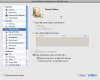
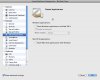
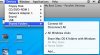
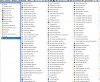
John@Parallels
Forum Maven
Case is a bit different, in first case it is Smart Mount , in the your case,
I suppose you need to delete folder C:\Documents and Settings\<username>\main Menu\Programs\Parallels Shared Applications
I suppose you need to delete folder C:\Documents and Settings\<username>\main Menu\Programs\Parallels Shared Applications
Thanks John
Actually it was installed at C:\Documents and Settings\otoc\Start Menu\Programs
After the folder was deleted, it no longer showed up in the Program list. That's the good news.
The bad news is after a restart of Win XP, the Shared Applications Folder showed up again with one program listed.
Please see attached file. For the record, Gimp has not been used for months.
Any other places to look, such as preference files or other config settings? There's been no change to the Parralels BC VM settings since the last screen captures.
Actually it was installed at C:\Documents and Settings\otoc\Start Menu\Programs
After the folder was deleted, it no longer showed up in the Program list. That's the good news.
The bad news is after a restart of Win XP, the Shared Applications Folder showed up again with one program listed.
Please see attached file. For the record, Gimp has not been used for months.
Any other places to look, such as preference files or other config settings? There's been no change to the Parralels BC VM settings since the last screen captures.
Attachments

John@Parallels
Forum Maven
In one thread I saw the message, that enabling Shared Applications, restart VM, disabling it from Configure helped,
If not Please submit report from Parallels Desktop - Help menu -selecting Report a Problem, and post here report ID
If not Please submit report from Parallels Desktop - Help menu -selecting Report a Problem, and post here report ID
Thanks again for the time John.
What I did in the meantime was repeat the process of deleting the folder.
Based on several restarts it seems fine now. No more Shared folder in the Program List in Windows.
Nothing more was done other than a second delete of that folder in the */Start Menu. No need to toggle the Shared Applications setting it seems.
Not only that, it seems to have taken care of drag and drop error message at the same time. Perhaps an alias issue from the unmapped folder? I'll update that thread after trying out your latest suggestion made there.
What I did in the meantime was repeat the process of deleting the folder.
Based on several restarts it seems fine now. No more Shared folder in the Program List in Windows.
Nothing more was done other than a second delete of that folder in the */Start Menu. No need to toggle the Shared Applications setting it seems.
Not only that, it seems to have taken care of drag and drop error message at the same time. Perhaps an alias issue from the unmapped folder? I'll update that thread after trying out your latest suggestion made there.
lol, I spoke too fast.
While the deleted "Shared Applications" folder never showed up on repeated reboots of the BC VM, I did come across another way for it to come back with more applications unrelated to anything I did.
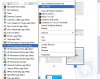
In this case, I right clicked on an image file I was preparing for a post and got the "Open with" menu selection. I selected a MAC app as shown in file 14. An HP app was selected and opened.
Afterwards, just out of a gut feeling, I checked the "Shared Applications" folder, file 15.
Once again it shows, and the settings for the BC VM are still showing up as having no sharing enabled. Not to mention I never selected anything that is now showing up in the folder that just won't go away.
While the deleted "Shared Applications" folder never showed up on repeated reboots of the BC VM, I did come across another way for it to come back with more applications unrelated to anything I did.
In this case, I right clicked on an image file I was preparing for a post and got the "Open with" menu selection. I selected a MAC app as shown in file 14. An HP app was selected and opened.
Afterwards, just out of a gut feeling, I checked the "Shared Applications" folder, file 15.
Once again it shows, and the settings for the BC VM are still showing up as having no sharing enabled. Not to mention I never selected anything that is now showing up in the folder that just won't go away.
Attachments

John@Parallels
Forum Maven
Well, I suppose it is time for ticket
Well, I suppose it is time for ticket
Thanks, will do. I appreciate the time you spent.