Hi, it's very annoying that I have this issue since months.
Every Time I connect my Office or HomeOffice Display Toolbox is setting my Desktop BLANK.
What I did:
Turned off Autodetect external displays (App doesn't care and detects my Displays and sets the Desktop BLANK - hides Files)
I cleared remembered displays.
Reconnected my Display and still get asked to switch to presentation mode (but I turned off Autodetect) - I choose not to use Presentation mode and opt in to remember this option - I click OK and Desktop gets BLANK!!! Why does he give me the option to choose and do otherwise?!
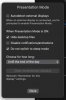
Look at the screenshot for my settings, all is ignored.
Am I the only one?
I still need this option, If I present something to my customers...
-> Last try.. I think I got it working with the autodetect external displays ON, but still need to restart my system to check if it's permanent.
Thanks for feedback or Bugreport. Even if I fixed it for me now, it's not working properly. Autodetect, shouldn't ask me and the do something else.
Every Time I connect my Office or HomeOffice Display Toolbox is setting my Desktop BLANK.
What I did:
Turned off Autodetect external displays (App doesn't care and detects my Displays and sets the Desktop BLANK - hides Files)
I cleared remembered displays.
Reconnected my Display and still get asked to switch to presentation mode (but I turned off Autodetect) - I choose not to use Presentation mode and opt in to remember this option - I click OK and Desktop gets BLANK!!! Why does he give me the option to choose and do otherwise?!
Look at the screenshot for my settings, all is ignored.
Am I the only one?
I still need this option, If I present something to my customers...
-> Last try.. I think I got it working with the autodetect external displays ON, but still need to restart my system to check if it's permanent.
Thanks for feedback or Bugreport. Even if I fixed it for me now, it's not working properly. Autodetect, shouldn't ask me and the do something else.