Printers not connected

HansV

Bit poster
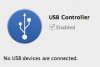
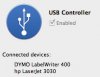
Every time I start Windows Vista as a Virtual Machine (PD 4 on OS-X 10.6) my two printers are not connected, although the USB Controller is enabled (see attachment). After disconnecting and connecting the USB cables from the printers everything is okay (see second attachment). Does anyone know why they are not automatic connected?
 

Attachments

  • nosusbconnected.jpg
    nosusbconnected.jpg
    24 KB · Views: 1
  • usbconnected.jpg
    usbconnected.jpg
    28.8 KB · Views: 1
Hello,

1> Click on the Apple logo on your Mac. Select "System Preferences". Select Sharing and then enable "Printer Sharing".
2> Start the Virtual Machine.
3> Select "Parallels Desktop" written on the top of the Mac screen. Click on "Preferences". Select USB. Under USB you will see a number of devices selected. Click on the Add button. Select the Hp ColorLaserJet printer over here.
4> Now, close this window.
5> Select Devices from the menu. Click on USB and check the Hpcolorlaserjet Printer.
6> Click on the start button which is at the bottom left hand corner of the Mac screen. Go to Control Panel. Select Printer and faxes.
7> Delete all the existing Printers from this window. Now, add a new printer.
8> Try printing the test page.

Also, please follow the knowlegdebase articles given below in regards to the issue:

http://kb.parallels.com/en/5156
http://kb.parallels.com/en/5783
http://kb.parallels.com/en/4990
 
Hello,

Thanks for the quick reply. I just followed all 8 steps and now my printer is found. Unfortunately I still have to select the printer via "Devices => USB" after every restart of the VM/Vista.

When I start a printer task from Vista I can select the correct printer in the list. From Vista it all seems to work, except nothing is really printed :-(
 
Back
Top