Problem in Revit 2008 after Upgrading from 2.5.3188 to 3.0.4128

Guest OS: Windows XP SP2
Program: AutoCAD Revit Architecture 2008
Problem: Temporary Dimensions are extremely small; do not magnify when zoomed in.

Take a Look. This first picture is with Parallels Version 2.5.3188
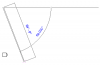
Picture 3.png

This picture is after upgrading to 3.0.4128
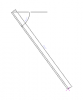
Picture 2.png

I have installed Parallels Tools and restarted Windows XP after installing Parallels Tools for Build 4128. There is no change when I enable DirectX in the Parallels configuration page. Can anyone offer a solution? Thanks!
 
Hello,
Please try to reinstall Parallels Tools in such way:
1. Actions -> Install Parallels Tools.
2. Choose "Custom" installation.
3. Uncheck "Coherence" and then uncheck "Video Driver".
4. Restart.

Does program work as expected?
 
Archy:

This method works. However, now I won't really be taking advantage of what Parallels 3 has to offer, since I won't be able to use DirectX. Will there be any sort of fix coming for this? Thanks for the help!
 
Okay, it's been 1-2 weeks, when can we expect an update? I paid for 2.5 and 3.0 and have only seen coherence work for a short period of time.

I only use Parallels for my Revit work and coherence is the best way to do it, but if the dimensions don't show, it doesn't work for me. A lot of my work is demonstrating software to clients. They need to see a product that works!

Please advise on the availability of the newest build that will display the dimensions and allow me to use coherence.

Regards,

Bruce
 
IMO I've tried everything. The only thing that worked was to re-install Parallels tools without coherence and video driver support.
 
Revit not working with parallels

I've tried to install Revit 9.0 on Mac book Bro/windows XP and the only message I get is that the configuration of my application is incorrect. Also a message pops up from windows saying that "virtual memory minimum too low", Does anybody knows waht that means?
 
Contact software manufacturer maybe they provide some advices, increase memory on VM, also try to install revit on new VM, and check, maybe antivirus or Windows corruption prevents Revit installation
 
Back
Top