ChristopheC2
Bit poster
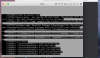
Hi I'm trying to install Linux on my parallel desktop for mac by following the instructions found on the parallels website (http://kb.parallels.com/en/124121). Something is not quite right and the installation cannot be completed. The screen shows a whole bunch of fail messages (see screenshot attached):
"Failed to execute / init"
"Kernel panic - not syncing:no init found"
I'm using a .iso file to install but it doesn't seem to link correctly.
Can someone please help?
Cheers.
Chris
"Failed to execute / init"
"Kernel panic - not syncing:no init found"
I'm using a .iso file to install but it doesn't seem to link correctly.
Can someone please help?
Cheers.
Chris