Hi,
I work on a Macbook Pro Retina with Parallels 8 - Windows 7 and MS Office 2010.
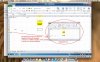
Unfortunately I stumbled upon a serious inconvenience: when I enter text in a cell of an Excel sheet on my macbook, then save the excel and send it to someone with a Windows pc and office 2010, then that very excel sheet has the same content but positioned differently. I include a screenshot to make things clear.
On both Excel instances, settings are equal.
Is this a retina/parallels related issue? Can somebody please help me on this?
Greetings,
Ben
I work on a Macbook Pro Retina with Parallels 8 - Windows 7 and MS Office 2010.
Unfortunately I stumbled upon a serious inconvenience: when I enter text in a cell of an Excel sheet on my macbook, then save the excel and send it to someone with a Windows pc and office 2010, then that very excel sheet has the same content but positioned differently. I include a screenshot to make things clear.
On both Excel instances, settings are equal.
Is this a retina/parallels related issue? Can somebody please help me on this?
Greetings,
Ben