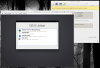
I have an iMac 27 inch, mid 2011 running on OS X Mountain Lion 10.8.5*. I am trying to set-up a virtual machine using OS X Yosemite 10.10.4 and the there is a serious video issue. The virtual machine is working BUT everything is super slow...
HINT: When I start OS X Yosemite Virtual machine, I always see a line "screening" the screen, from top to bottom, indicatiog the machine has trouble rendering the screen. For ME this is a clear indication that what I try (tried) didn't worked.
* Processor 2.7 GHz Intel Core i5
* Memory 16 GB 1333 MHz DDR3
I tried all (I think) the solutions that I found on the internet, but nothing is working...
------
I tried [ sudo nvram boot-args="debug=0x10" ] in the computer itself, not working
I tried [ sudo nvram boot-args="debug=0xd4e" ] in the computer itself, not working
Nothing anormal in the "Activity monitor" window of the Yosemite virtual machine OR in my computer itself.
------
Please help!
HINT: When I start OS X Yosemite Virtual machine, I always see a line "screening" the screen, from top to bottom, indicatiog the machine has trouble rendering the screen. For ME this is a clear indication that what I try (tried) didn't worked.
* Processor 2.7 GHz Intel Core i5
* Memory 16 GB 1333 MHz DDR3
I tried all (I think) the solutions that I found on the internet, but nothing is working...
------
I tried [ sudo nvram boot-args="debug=0x10" ] in the computer itself, not working
I tried [ sudo nvram boot-args="debug=0xd4e" ] in the computer itself, not working
Nothing anormal in the "Activity monitor" window of the Yosemite virtual machine OR in my computer itself.
------
Please help!