
Hello Mr./Mrs.,
I have a problem reducing the size of my Windows 10 VM, using Parallels 12.0.2 and macOS 10.12.0. My VM is currently 120GB, but I like it to be max 110GB. I have +-50GB space left on my main drive where the .pvm is located, and I have +-20GB free space on my windows virtual drive (C).
I already tried this:
1) shut down the VM
2) Control Center -> Windows 10 -> Configure -> hardware -> Hard Disk 1 -> Edit -> a) I can't select a size smaller than the current 120GB; b) selecting "expanding disk" generates an error with problem ID 41601.
3) Control Center -> Windows 10 -> Configure -> hardware -> hard disk 1 -> compress... -> error with problem ID 498.
4) Control Center -> Windows 10 -> Manage Snapshots -> "no snapshots available".
Thank you very much!
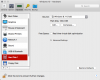

I have a problem reducing the size of my Windows 10 VM, using Parallels 12.0.2 and macOS 10.12.0. My VM is currently 120GB, but I like it to be max 110GB. I have +-50GB space left on my main drive where the .pvm is located, and I have +-20GB free space on my windows virtual drive (C).
I already tried this:
1) shut down the VM
2) Control Center -> Windows 10 -> Configure -> hardware -> Hard Disk 1 -> Edit -> a) I can't select a size smaller than the current 120GB; b) selecting "expanding disk" generates an error with problem ID 41601.
3) Control Center -> Windows 10 -> Configure -> hardware -> hard disk 1 -> compress... -> error with problem ID 498.
4) Control Center -> Windows 10 -> Manage Snapshots -> "no snapshots available".
Thank you very much!
Last edited: