Problem with upper casing. parallels 10.4.0.

rccharles

Bit poster
Version of Parallels 10.4.0 29337.

Using shift, control, option, caps lock and command keys no long work. I believe these keys worked for me around Christmas.

Problem with all virtual machines. Verified with el Capitan vm. created new vm. download el capitan. no updates. Cannot enter @ for my appleid. Copy of @ failed too. read about fix. tried. rebooted vm. no workie.

I followed the advice here no change was observed. rebooted the os. still didn't work.
http://kb.parallels.com/116994
Screen Shot 2016-04-26 at 3.30.15 PM.png

Robert
 

Attachments

  • Screen Shot 2016-04-26 at 3.56.26 PM.png
    Screen Shot 2016-04-26 at 3.56.26 PM.png
    57.6 KB · Views: 2
Last edited:
Version of Parallels 10.4.0 29337.

Using shift, control, option, caps lock and command keys no long work. I believe these keys worked for me around Christmas.

Problem with all virtual machines. Verified with el Capitan vm. created new vm. download el capitan. no updates. Cannot enter @ for my appleid. Copy of @ failed too. read about fix. tried. rebooted vm. no workie.

I followed the advice here no change was observed. rebooted the os. still didn't work.
http://kb.parallels.com/116994

View attachment 11133

Robert
Hello rccharles,
You could also try reinstalling the Parallels tools, Actions>Reinstall Parallels Tools. Let us know how it works.
 
Thanks, I did that on parallels 11. I upgraded to the free trail of Parallels 11. Even with Parallels 11, I am still having the problem. After I reinstalled the vm additions to a mac os 10.6.8 vm, I rebooted my mac mini and rebooted the 10.6.8 vm. I did a new install of DOS 6.2.2 to create a vm quickly. Still had the casing problem.

My setup is more complicated than I let reported in my first post. Yesterday, I logged in locally from a direct keyboard and display. Worked fine at least with upper casing letters. Normally, I connect remotely.

Still not working remotely. I'm using a realVNC server 3.5.0 (r15303) on my mac 10.10.5 mac mini. I use a remote fedora 20 linux on Ibm Thingkpad t20 as the client, linux 3.14.3-200 Fedora 20 with a realvnc client 5.2.3 (r8648) 32 bit. I'm logging into my mac mini 10.10.5 and running apps as always. I'm not remoting into parallels remotely nor the vms. Curiously, if I use a directly attached keyboard instead of my remote keyboard I get upper casing within the Parallel vm's. I do not see this problem with virtualbox when logged into my mac mini. [ virtualbox doesn't see my dvds, but that another issue. Although it makes me persist longer with parallels. ]

I'm beginning to suspect some interaction between parallels and realvnc. Cannot say it a clear vnc problem since Virtual box works.

Robert
 
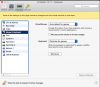
Hi rccharles , you may try changing the OS X shortcuts. Go to Parallels Desktop menu bar -> Parallels Desktop -> Preferences -> Shortcuts -> System Shortcuts and set "Send system shortcuts" to "Always" and check how it works.
 
Back
Top