RaffaeleD1
Junior Member
MACBOOK PRO 16" 64gb RAM and AMD RADEON PRO 5500M 8gb Vram
PARALLEL DESKTOP PRO latest version
WINDOWS 10
PTC CREO 8 Trial Version
Hi, i'm currently a Solidworks 2021 user on parallel but i'm feed up with it's graphics manage... it's quite slow to do everything expecially on big dimension file. Now, based on a my collegue experience who's very satisfied with Creo on Windows PC, I decided to buy CREO 8 and installed the trial version on a new virtual machine to test it on parallel. Everything works OK and graphics is really faster than Solidworks without any needs to hack the registry settings.
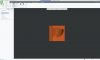
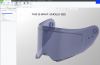
I just have one problem when activate RENDER STUDIO..... I can't see the model on display area but if I try to save the rendered image it is OK.
Attached an image of my display and the same file open on my collegue machine.
Does anybody had my same issue and solved it?
PARALLEL DESKTOP PRO latest version
WINDOWS 10
PTC CREO 8 Trial Version
Hi, i'm currently a Solidworks 2021 user on parallel but i'm feed up with it's graphics manage... it's quite slow to do everything expecially on big dimension file. Now, based on a my collegue experience who's very satisfied with Creo on Windows PC, I decided to buy CREO 8 and installed the trial version on a new virtual machine to test it on parallel. Everything works OK and graphics is really faster than Solidworks without any needs to hack the registry settings.
I just have one problem when activate RENDER STUDIO..... I can't see the model on display area but if I try to save the rendered image it is OK.
Attached an image of my display and the same file open on my collegue machine.
Does anybody had my same issue and solved it?