PTC Creo Display Style - Shading with reflections

DanC14

Junior Member
Hi Anyone
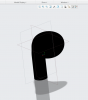
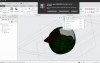
Know how to get better shading on "shading with reflections" i'm currently drawing blank.......image with shadow and ref but no tone on the model
Is this a graphics card issue?

Running Parallels V15 on Catalina on a
MacBook Pro (Retina, 15-inch, Mid 2015)
2.5 GHz Quad-Core Intel Core i7
16 GB 1600 MHz DDR3
upload_2021-3-26_17-17-3.png
 
Hello, could you check the same behavior with the latest Parallels Desktop version (trial period) please?
If the issue still actual with Parallels Desktop 16 please collect the tech report and post the report's ID here.
We are looking forward to your reply and will be glad to help.
 
I don't know if it will help, but I am a long time Creo user. I run a 2019 MacBook Pro, Parallels 16, the latest version of Windows 10, and Creo 7.0.2.0, and I don't have the issues you are showing. Without knowing what version of Creo and Windows you're on, it's hard to troubleshoot. I don't think it's the graphics card because Parallels doesn't have direct access to the card on Macs. It could very easily be a config.pro setting.
 
I don't know if it will help, but I am a long time Creo user. I run a 2019 MacBook Pro, Parallels 16, the latest version of Windows 10, and Creo 7.0.2.0, and I don't have the issues you are showing. Without knowing what version of Creo and Windows you're on, it's hard to troubleshoot. I don't think it's the graphics card because Parallels doesn't have direct access to the card on Macs. It could very easily be a config.pro setting.
Thanks a lot for the provided information, are you running the latest Parallels Desktop version?
 
I don't know if it will help, but I am a long time Creo user. I run a 2019 MacBook Pro, Parallels 16, the latest version of Windows 10, and Creo 7.0.2.0, and I don't have the issues you are showing. Without knowing what version of Creo and Windows you're on, it's hard to troubleshoot. I don't think it's the graphics card because Parallels doesn't have direct access to the card on Macs. It could very easily be a config.pro setting.
Hi Luther Thanks for the comment, i'm running Creo 4 on the latest version of windows 10, i will check my Config.pro settings and let you know.
 
Hi Luther Thanks for the comment, i'm running Creo 4 on the latest version of windows 10, i will check my Config.pro settings and let you know.
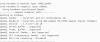
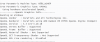
Do you have similar Open GL setting in your System information window?
upload_2021-4-15_10-42-43.png
 

Attachments

  • upload_2021-4-15_10-42-15.png
    upload_2021-4-15_10-42-15.png
    75.5 KB · Views: 5
In Parallels, I have the exact same info displayed with the exception of the line 'Open GL Version: 3.3 ATI-3.10-18', where I have Open GL Version: 3.3 ATI-4-2-15'.
You are on version 16 of Parallels the same as mine, maybe the Open GL is the PTC part not Parallels?
 
You are on version 16 of Parallels the same as mine, maybe the Open GL is the PTC part not Parallels?
I don't think so. I do also have a different graphics card listed in the OpenGL Renderer as I am on a different machine. It's possible that the graphics card has a different driver in Parallels, but that's purely speculation. I looked at the platform support for Creo 4.0, and it says that the latest version of Windows 10 supported by Creo 4.0 is 1909. I'm not going to suggest that you upgrade to a more recent version of Creo just to fix this, but it's certainly a possibility that is related.
 
Back
Top