
Install the app
How to install the app on iOS
Follow along with the video below to see how to install our site as a web app on your home screen.
Note: This feature may not be available in some browsers.
You are using an out of date browser. It may not display this or other websites correctly.
You should upgrade or use an alternative browser.
You should upgrade or use an alternative browser.
Quicken
- Thread starter Agmanbrad
- Start date

Ram@Parallels
Parallels Support
Hello Agmanbrad,
Please provide us the below information:
1. what is the version of Parallels Desktop and Mac ?
2. What is the version of Windows ?
3. Is it a retina display Mac ?
4. Please provide us a screen shot of Quicken when it has Double headings and wrong size of fonts.
If you are using a retina display Mac Please perform the steps as suggested at http://kb.parallels.com/114700
Please provide us the below information:
1. what is the version of Parallels Desktop and Mac ?
2. What is the version of Windows ?
3. Is it a retina display Mac ?
4. Please provide us a screen shot of Quicken when it has Double headings and wrong size of fonts.
If you are using a retina display Mac Please perform the steps as suggested at http://kb.parallels.com/114700
Here is your Information
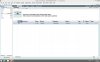
Hello Agmanbrad,
Please provide us the below information:
1. what is the version of Parallels Desktop and Mac ? Build 9.0.24229 (Revision 991745; Tuesday, April 1, 2014)
2. What is the version of Windows ? Windows 8.1
3. Is it a retina display Mac ? Yes
4. Please provide us a screen shot of Quicken when it has Double headings and wrong size of fonts.
If you are using a retina display Mac Please perform the steps as suggested at http://kb.parallels.com/114700
Thomas_Schoenfeld
Bit poster
I have had a similar experience with Quicken Deluxe 2014 -- double menu icons at the top, plus account register fonts that are proportionately much larger than fonts in other panes. See my solution (and that of several others) in the thread "Parallels 9 on Retina Mac - Double menus?” in the Windows Guest OS forum. Note that I have not found Retina display settings to be at fault here.

Hi all,
Please update Parallels Desktop 9 to latest build version as suggested on the link below :
http://kb.parallels.com/111603
To adjust screen resolution and get normal display on Windows Virtual Machine, please refer http://kb.parallels.com/111603 and let us know how it goes.
Please update Parallels Desktop 9 to latest build version as suggested on the link below :
http://kb.parallels.com/111603
To adjust screen resolution and get normal display on Windows Virtual Machine, please refer http://kb.parallels.com/111603 and let us know how it goes.
Thomas_Schoenfeld
Bit poster
Sorry, I guess I need to reiterate here what I posted in the Windows Guest OS forum re: "Parallels 9 on Retina Mac - Double menus?" started 12/15/13 by BryceR. I have had a similar experience to Agmanbrad (and apparently others) with Quicken Deluxe 2014 -- double menu icons at the top, plus account register fonts that are proportionately much larger than fonts in other panes. I'm running Windows 8.1 in Parallels 10.0.2 (27712) on a Macbook Pro with Retina display running Mavericks (10.9.5), so I am running the latest Parallels and Windows. I have not had this problem with Quicken Deluxe 2014 on an old PC running Windows XP. There, all the panes and the menu bar use the same font size. So, following the tech support solution reported in the Windows Guest OS forum by Rev Peter, I have found the change in Windows display settings (“dpi”) to be individually effective, whereas disabling vertical synchronization in Parallels (the virtual machine) was without additional effect, and disabling the Retina display in favor of scaling actually made the text unacceptably blurry, as BryceR also noted in the Windows Guest OS forum. It was an interesting experiment: in Windows, at the recommended screen resolution of 2880x1564, the default size of all items was set to “extra large - 200%”, and produced the menu doubling. By setting this one notch lower, to 150%, most of the menu doubling disappeared and the account register font was tolerably large and the other pane fonts were tolerably small, i.e., still readable. I first went to 100%, as suggested in the Rev Peter post, but everything was much too small to read, although the doubling also completely disappeared. Keep in mind: this is a compromise, as it still does not fix the disproportion between screen fonts in Quicken on Parallels. And the screen resolution adjustment suggested by ManojD also does not touch this disproportion. That's what Parallels and Quicken need to address, especially given that Quicken is one of the most popular apps for those guesting Windows on a Mac. But it does make the disproportion tolerable, enough to enable me to migrate my work with Quicken for Windows from the PC to the Mac.
This is a problem for me too. My Quicken can look like Agmanbrad's photo, except if one were to have a register contents displayed (I understand there would be privacy issues) the problem would be revealed to be much worse -- text so big on the register lines that the software cannot be used. I have several points to make.
1. This problem also occurs for me with Microsoft Outlook. Like Quicken, Outlook has multiple sub-windows within its main window that use different fonts and different font sizes.
2. For me, this problem did not occur at first use. It first happened when I switched from using my MBP at my desk, where an external 1920x1200 monitor is connected, to portable MBP use, where I use the MBP's retina screen. As soon as I saw Quicken on the MBP display, its appearance had gone crazy with the double menu and wild font sizes. I have applied a Windows 8.1 registry tweak that makes the windows' borders very narrow. I noticed that when the Quicken and Outlook fonts/font sizes/menus went all crazy, that I had also lost the narrow-windows-borders registry tweak. So, when this glitch occurs, it also affects seemingly unrelated parameters in the Windows registry. I was able to fix it when it happened the first time by restoring a recent backup of my virtual machine file. Everything was back to normal, until it happened again on a subsequent display change. The various scaling workarounds suggested are just that -- workarounds, and do not restore the proper fonts and text sharpness to Quicken or Outlook.
3. Oddly, this issue doesn't occur every time I switch displays. Sometimes it does not occur. I think it's related to whether Quicken or Outlook are open, or are minimized or on screen. I haven't figured out if there is an exact combination, or if it just occurs randomly.
4. My workaround is to keep a recent VM file backup at the ready in another folder. When the problem happens, I close the running VM, overwrite it with the backup copy and start it up. Then I can continue working with proper Quicken and Outlook appearances. (I keep my data outside the VM file, so this procedure does not cause me to lose any data.)
5. This problem has been reported many times. A quick search revealed this thread and three others.
https://forum.parallels.com/threads/parallels-9-on-retina-mac-double-menus.295500/#post-764930
https://forum.parallels.com/threads/huge-problems-parallels-8-and-windows.262468/
https://forum.parallels.com/threads/parallels-9-and-quicken.292557/
6. I started using Parallels at Parallels 9. The problem has continued unchanged through Parallels 10 and now 11. I think it's really time for the Parallels team to properly fix this.
7. I am presently running a 30-day trial of VMware Fusion. I have deliberately tested for this problem on Fusion, and am happy to report that it does not occur. I can switch between my two displays endlessly with no font/resolution/double menu/etc. issues. Unfortunately Fusion has a few other usability issues. Parallels is clearly ahead in Mac-Windows integration. I'd like to stay with Parallels, but will move to Fusion if there's no coming solution to this.
1. This problem also occurs for me with Microsoft Outlook. Like Quicken, Outlook has multiple sub-windows within its main window that use different fonts and different font sizes.
2. For me, this problem did not occur at first use. It first happened when I switched from using my MBP at my desk, where an external 1920x1200 monitor is connected, to portable MBP use, where I use the MBP's retina screen. As soon as I saw Quicken on the MBP display, its appearance had gone crazy with the double menu and wild font sizes. I have applied a Windows 8.1 registry tweak that makes the windows' borders very narrow. I noticed that when the Quicken and Outlook fonts/font sizes/menus went all crazy, that I had also lost the narrow-windows-borders registry tweak. So, when this glitch occurs, it also affects seemingly unrelated parameters in the Windows registry. I was able to fix it when it happened the first time by restoring a recent backup of my virtual machine file. Everything was back to normal, until it happened again on a subsequent display change. The various scaling workarounds suggested are just that -- workarounds, and do not restore the proper fonts and text sharpness to Quicken or Outlook.
3. Oddly, this issue doesn't occur every time I switch displays. Sometimes it does not occur. I think it's related to whether Quicken or Outlook are open, or are minimized or on screen. I haven't figured out if there is an exact combination, or if it just occurs randomly.
4. My workaround is to keep a recent VM file backup at the ready in another folder. When the problem happens, I close the running VM, overwrite it with the backup copy and start it up. Then I can continue working with proper Quicken and Outlook appearances. (I keep my data outside the VM file, so this procedure does not cause me to lose any data.)
5. This problem has been reported many times. A quick search revealed this thread and three others.
https://forum.parallels.com/threads/parallels-9-on-retina-mac-double-menus.295500/#post-764930
https://forum.parallels.com/threads/huge-problems-parallels-8-and-windows.262468/
https://forum.parallels.com/threads/parallels-9-and-quicken.292557/
6. I started using Parallels at Parallels 9. The problem has continued unchanged through Parallels 10 and now 11. I think it's really time for the Parallels team to properly fix this.
7. I am presently running a 30-day trial of VMware Fusion. I have deliberately tested for this problem on Fusion, and am happy to report that it does not occur. I can switch between my two displays endlessly with no font/resolution/double menu/etc. issues. Unfortunately Fusion has a few other usability issues. Parallels is clearly ahead in Mac-Windows integration. I'd like to stay with Parallels, but will move to Fusion if there's no coming solution to this.
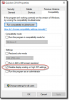
I resolved my scaling issues with Quicken 2014 by checking 'Disable display scaling on high DPI settings' in Windows on the Quicken shortcut (see attached screen shot).
I'm running a Mac 5k 27" with Parallels 11 and Windows 10 -- I was having the Quicken 2014 resolution issues mentioned, too.
I have my Mac's Display setting set to 'Scaled' and set to the far right 'More Space' option.
I have my Windows resolution set to 2967 x 1668 with scaling at "100%".
I have my Parallels Graphics > Retina Resolution set to 'Scaled'.
Given all the above, Quicken 2014 now shows up as expected in Windows (all fonts are scaled the same and everything is readable).
Not too obvious and I didn't see this mentioned anywhere else. Good luck!
====
Side note: To get to the Properties page attached here in Windows 10, search on "Quicken" in the Windows search bar, right+click and select 'Open File Location', then right+click again and select Properties on the Quicken 2014 shortcut, then select the Compatibility tab.
I'm running a Mac 5k 27" with Parallels 11 and Windows 10 -- I was having the Quicken 2014 resolution issues mentioned, too.
I have my Mac's Display setting set to 'Scaled' and set to the far right 'More Space' option.
I have my Windows resolution set to 2967 x 1668 with scaling at "100%".
I have my Parallels Graphics > Retina Resolution set to 'Scaled'.
Given all the above, Quicken 2014 now shows up as expected in Windows (all fonts are scaled the same and everything is readable).
Not too obvious and I didn't see this mentioned anywhere else. Good luck!
====
Side note: To get to the Properties page attached here in Windows 10, search on "Quicken" in the Windows search bar, right+click and select 'Open File Location', then right+click again and select Properties on the Quicken 2014 shortcut, then select the Compatibility tab.
Attachments
Last edited:

Hello, It seems that you're on outdated build of Parallels Desktop 11, please update Parallels Desktop to the latest build 11.1.1 (32312). You can update to the latest build as suggested in this article. Latest version always available here: http://www.parallels.com/directdownload/pd11/ Please note that Parallels Tools also needs to be updated (Actions > Update Parallels Tools). Please see this article to know more about Parallels Desktop 11 for Mac updates summary.