Reduce size of Windows VM hard disk ?

Andrew_Bollman

Bit poster
Hello,

I keep finding my Windows VM taking up too much space on my computer, so I want to reduce the size allocated to it. However I'm only finding posts on the forums for how to INCREASE the size of the virtual disk, not for DECREASING size.

Best I could find was the Configure --> Hardware --> Hard Disk 1 --> Edit method, but my checkbox for "Resize file system" is grayed out and I also can't find info on why that is.

-- Andrew
 
Hello,

I keep finding my Windows VM taking up too much space on my computer, so I want to reduce the size allocated to it. However I'm only finding posts on the forums for how to INCREASE the size of the virtual disk, not for DECREASING size.

Best I could find was the Configure --> Hardware --> Hard Disk 1 --> Edit method, but my checkbox for "Resize file system" is grayed out and I also can't find info on why that is.

-- Andrew
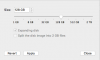
To decrease virtual hard disk size, do the following:
1. Start Parallels Desktop, but do not start your virtual machine. Shut it down if it is running.
2. Right-click on the Parallels Desktop icon in the Dock, then select Control Center (Virtual Machines list in older versions).
3.Right-click on your virtual machine and choose Configure.
4.Go to the Hardware tab, open Hard Disk 1, and click Edit.
5.Choose the size you want for the virtual hard disk, check Resize file system and click Apply.
 
What am I suppuse to do in this situation? I can slide in lower from 128GB to 80GB click apply BUT then after a few seconds it just goes backt to 128GB. I don't have an option to "resize". Please help.
 

Attachments

  • Screen Shot 2018-01-17 at 3.26.10 PM.png
    Screen Shot 2018-01-17 at 3.26.10 PM.png
    20.9 KB · Views: 6
Back
Top